

Sandbox
The Sandbox gives every project remote, API-driven runtime containers for running code, managing files, opening interactive terminals, and previewing apps. It boots a full Linux container (Python, Node, or a multi-runtime base image) that an agent — or a person — can drive over its whole lifecycle: create, exec, snapshot, fork, persist, and tear down.
It is the execution substrate behind coding agents and any workflow that needs a real shell, a real filesystem, and real packages rather than a sandboxed function.
Enterprise module
Sandbox is part of the enterprise edition. The dashboard pages exist in the community build but show an upgrade prompt; the /api/sandbox/* routes and the runtime only activate for a tenant with an active enterprise license. See Licensing.
Overview
The landing page (Operate → Sandbox) summarises everything provisioned in the active project: counts of sandboxes, templates, volumes, and snapshots, a "how to use" helper, and a live table of recent sandboxes with their state, snapshot/base image, region, resources, uptime, and last activity.
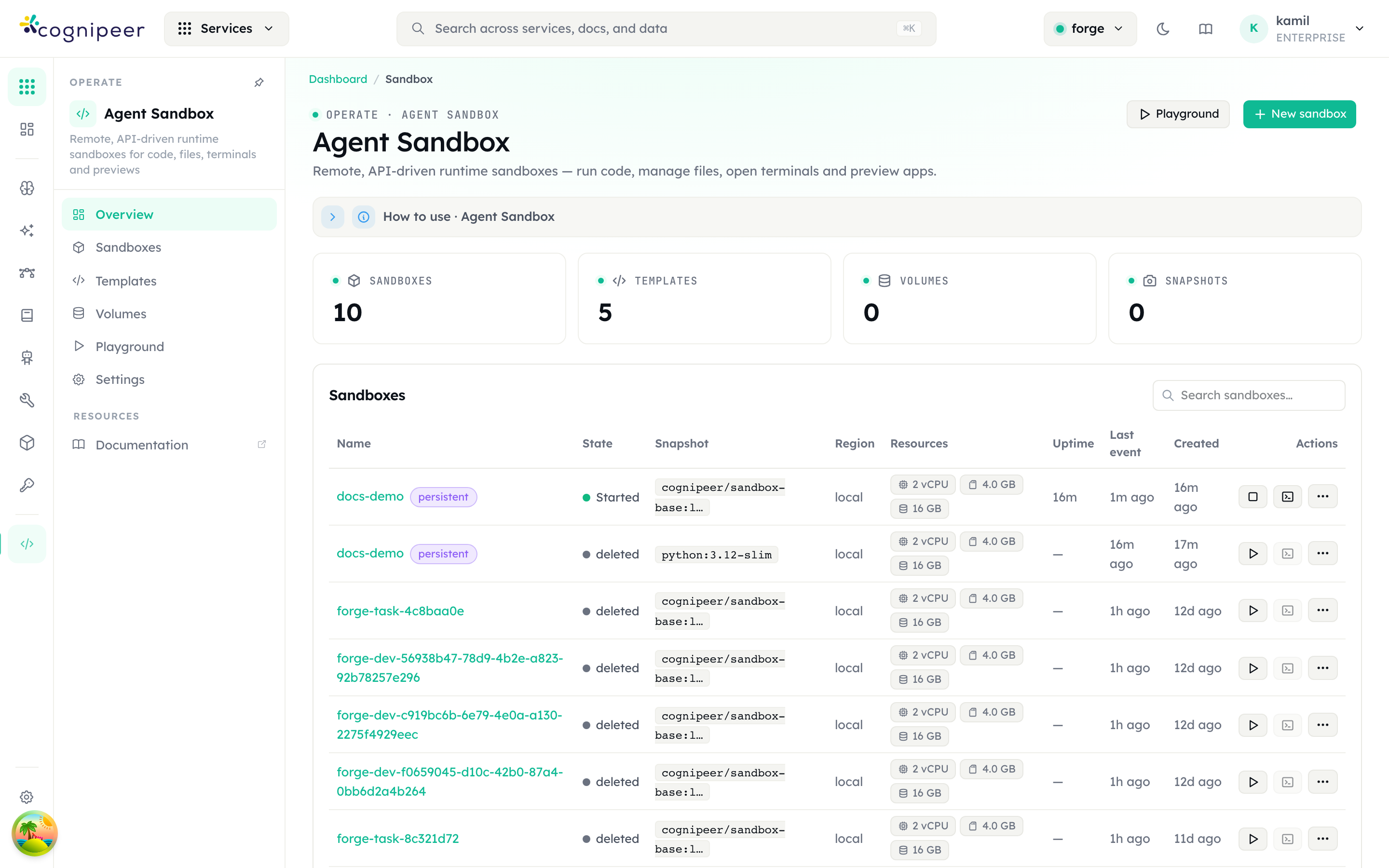
What to read on this screen:
- Sandboxes / Templates / Volumes / Snapshots tiles count objects in the active project only. Switch projects from the header pill to change scope.
- The State column reflects the container's real state as reported by the runner —
Started,stopped, ordeleted. Only aStartedsandbox accepts exec, terminal, and filesystem calls. - New sandbox opens the create dialog; Playground jumps to the interactive REPL.
Core concepts
| Concept | What it is |
|---|---|
| Sandbox (instance) | A concrete container launched from a template. Tracks a desiredState (what you asked for) versus an actualState (what the runner reports). Can be ephemeral or persistent. |
| Template | A reusable recipe — base image, runtime, isolation level, default resources, env, and toolbox port — that new sandboxes are launched from. |
| Volume | Persistent storage mounted at /workspace, backed by object storage (S3 or Azure Blob). Survives instance deletion and can be attached to or detached from a sandbox. |
| Snapshot | A point-in-time image of a sandbox's filesystem (docker commit). A snapshot lives on the runner; a backup is also exported to object storage. Used to resume or fork. |
| Runner | The compute node that actually runs containers. Either an external agent (remote/DinD/Kubernetes) the console polls, or the built-in Docker-direct runner that talks to the local Docker daemon in-process. |
| Terminal session | An interactive WebSocket-multiplexed PTY into a running sandbox, auto-closed after a TTL. |
The relationships: a project owns runners, templates, volumes, snapshots, and sandboxes. A sandbox references one template, optionally one volume, and may have many snapshots.
Create a sandbox
New sandbox opens a single-screen dialog. You can launch from a template or from a snapshot.
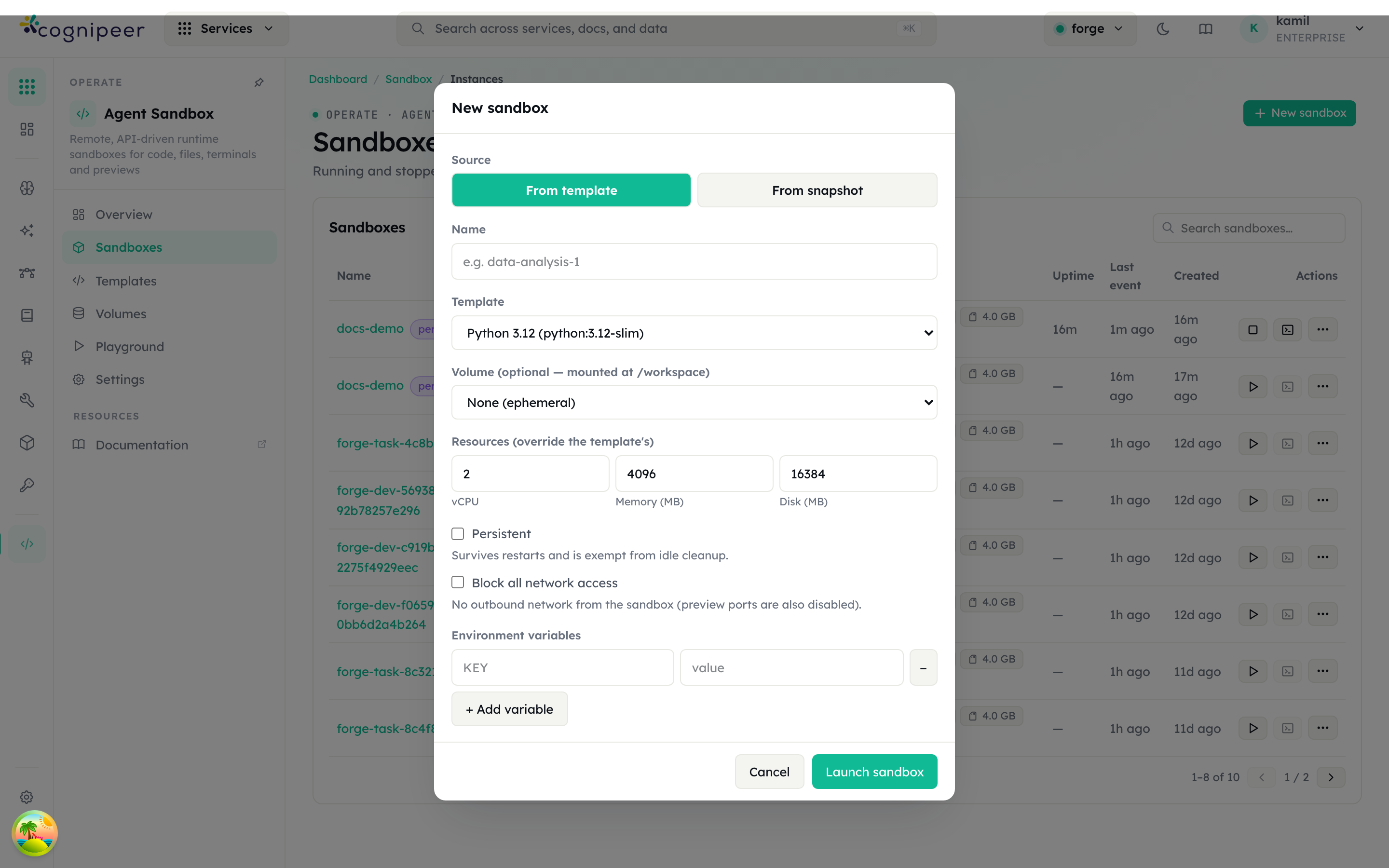
Fields:
- Source —
From template(a fresh container) orFrom snapshot(resume a previously captured filesystem). - Name — a human label; if omitted, one is generated.
- Template — the base image and runtime to launch (e.g. Python 3.12, Node.js 22, or the multi-runtime Cognipeer Sandbox base).
- Volume (optional) — attach a persistent volume mounted at
/workspace.Nonemeans an ephemeral workspace that disappears when the container is removed. - Resources — vCPU / memory (MB) / disk (MB) for this sandbox. Leave a field blank to inherit the project default, then the platform default (see Resource limits). Values above the operator cap are clamped on launch.
- Persistent — when checked, the sandbox survives restarts and is exempt from idle cleanup. Ephemeral sandboxes are reaped once idle (see Idle reaping).
- Block all network access — when checked, all outbound traffic from the container is blocked (preview ports are also disabled).
- Enable port preview / Allow public share links — turn preview on (default) and choose public (session-less share links) vs private (login-only). Both are also editable later from the Preview tab.
- Environment variables — per-sandbox env, merged over the template's defaults. Values are write-only: see Environment variables are sealed. Each row can also take its value from Config instead — see Environment variables from Config.
Submitting calls POST /api/sandbox/instances, which records the sandbox in pending, picks a runner, and enqueues a create-sandbox command. The runner pulls/starts the container and reports back; the row flips to Started.
Sandboxes list
Sandboxes is the full list of running and stopped containers, with inline actions per row (start ▶, stop, snapshot, fork, terminal, delete).
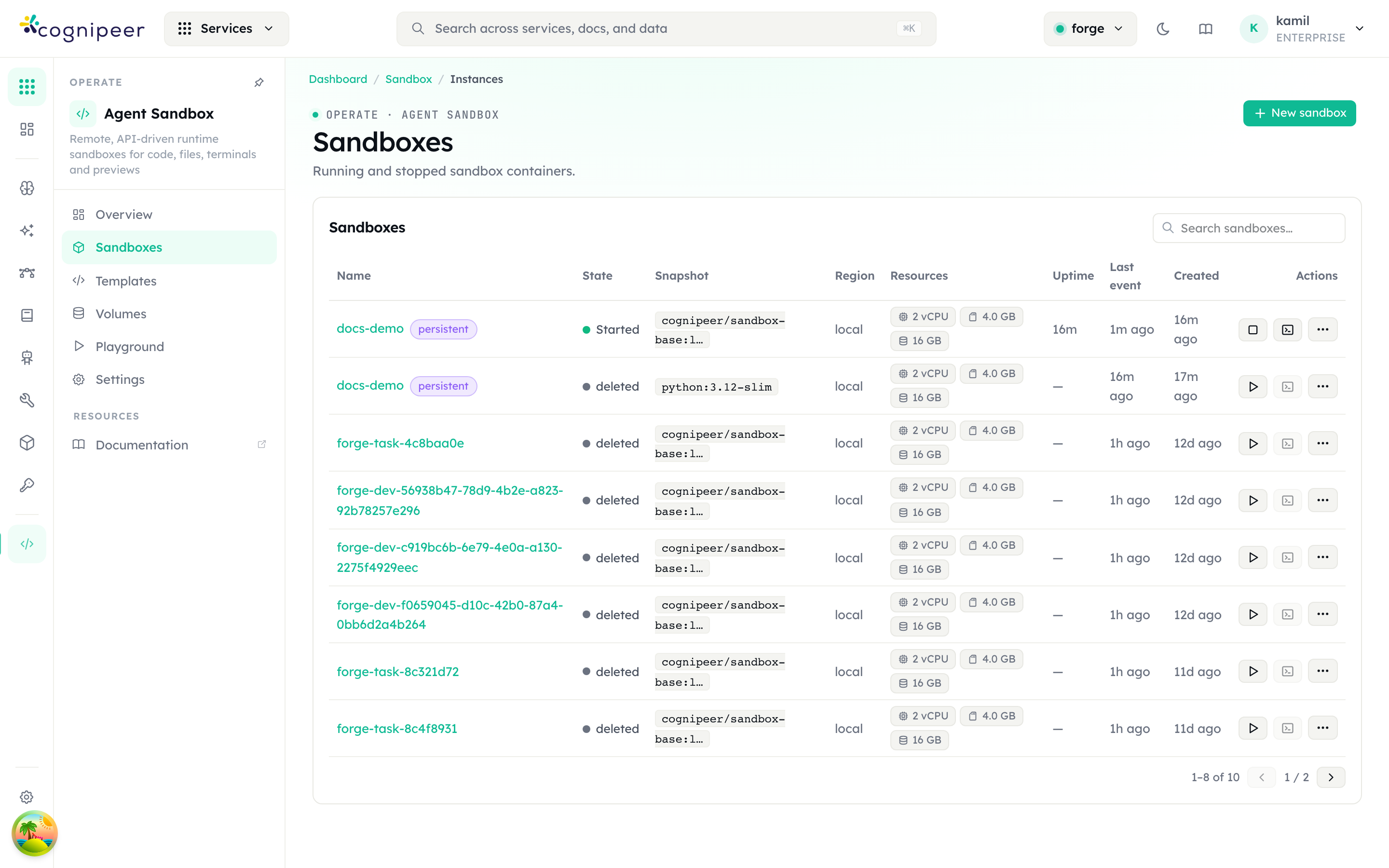
The Resources column shows the effective vCPU / memory / disk limits, Uptime is wall-clock since start, and Last event is the most recent runner report — a quick way to spot a container whose runner has gone quiet.
Inspect a sandbox
Clicking a row opens the detail screen, organised into tabs: Overview, Metrics, Preview, Terminal, and Filesystem.
Overview
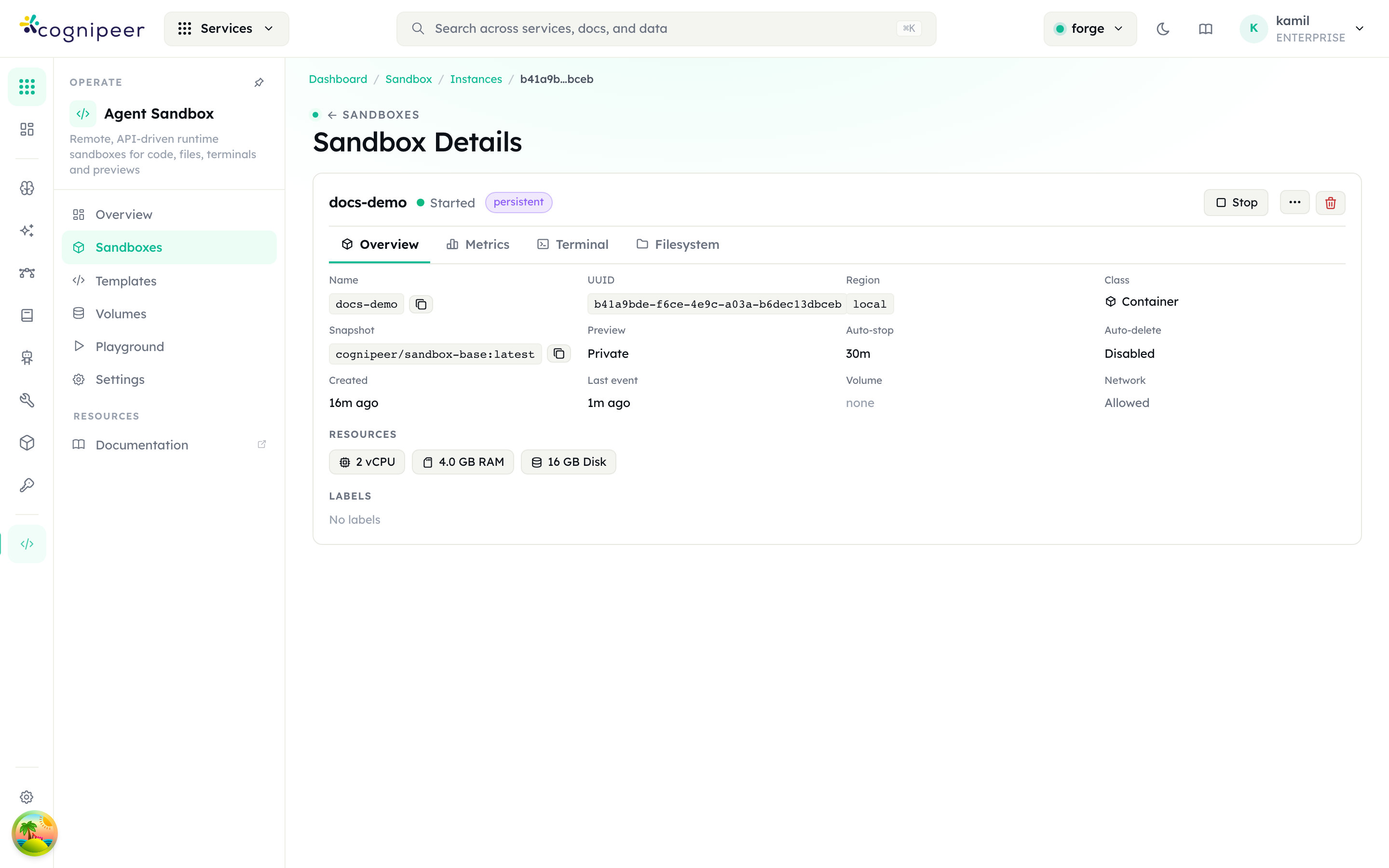
The overview is the operational summary: name, UUID, region, class (Container), the base image / snapshot it was launched from, preview visibility, auto-stop and auto-delete policy, the attached volume (or none), the network policy, the resource limits, and labels. The header carries the Stop, overflow (snapshot / fork / attach volume), and delete actions.
Metrics
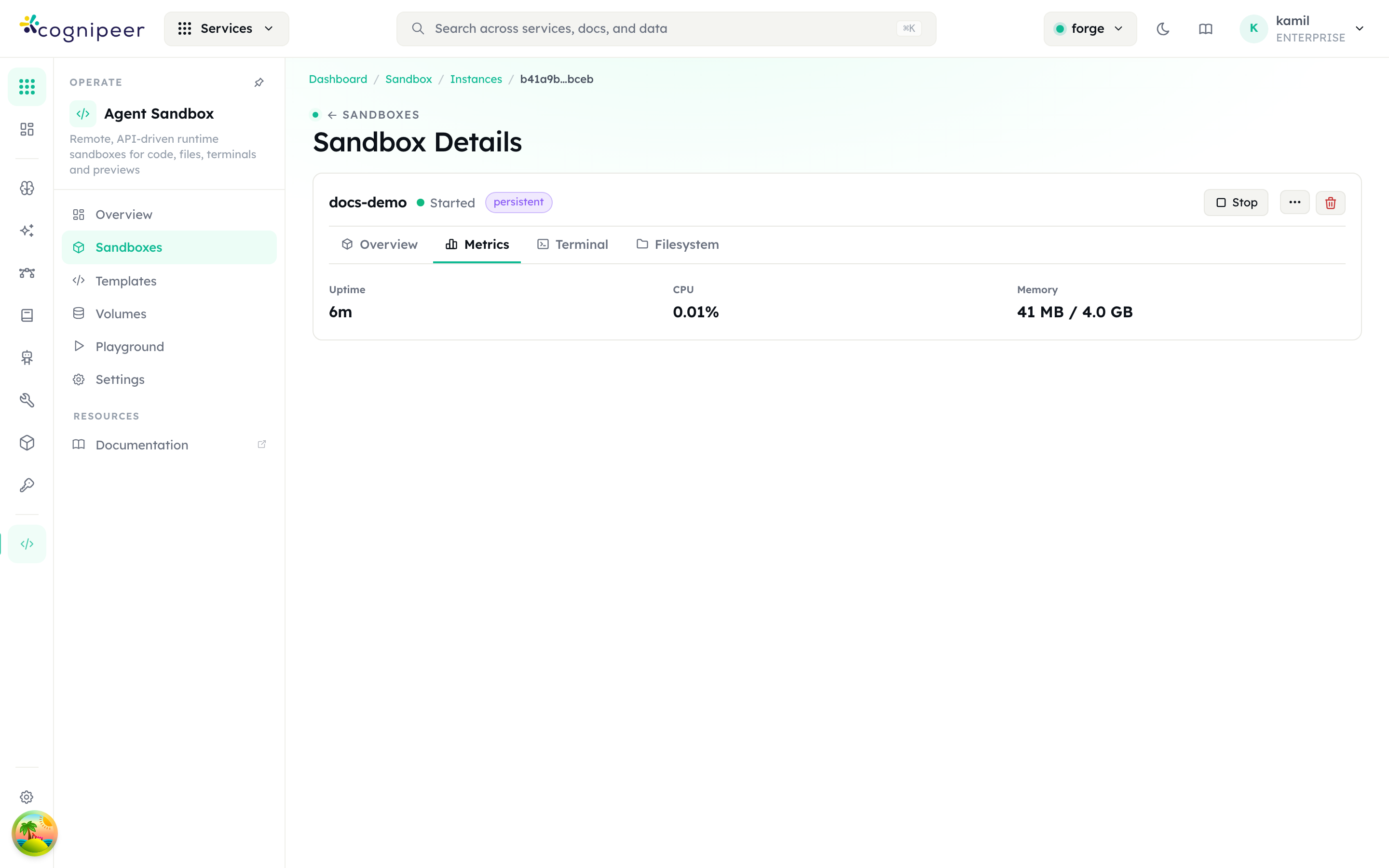
Live container stats sampled from the runner: uptime, CPU percentage, and memory used against the limit. If the runner cannot report stats, the panel says so rather than showing stale numbers.
Preview
The Preview tab reaches a web service you start inside the sandbox — a dev server, a built app, an API — from your browser. This makes the dev-agent loop work end to end: an agent writes code, starts npm run dev (or python -m http.server, vite, …), and you open the result; once it's right, the agent commits and pushes to git (the sandbox has full network egress unless you blocked it).
How it works — and why it needs no ingress, DNS, or subdomain change:
- Any port works — you (or the agent) choose the port; there is no fixed list. The common dev ports (
3000, 5173, 8000, 8080, override withSANDBOX_PREVIEW_PORTS, plus any ports declared on the template) are pre-published to ephemeral host ports when the container starts; a request for any other port transparently provisions a tiny on-demand forwarder, so it reaches the service all the same. (SetSANDBOX_PREVIEW_ALL_PORTS=offto restrict preview back to the pre-published set.) - The one requirement: the service must listen on
0.0.0.0, not just127.0.0.1— the Preview tab flags loopback-only listeners. - The Preview tab also detects listening ports live: every TCP port something is actually listening on inside the sandbox is listed with its state, next to a free-form "open any port" field.
- A request to
/api/sandbox/instances/:id/preview/:port/*is proxied — riding the console's existing origin under a path — to that port inside the sandbox. Open launches it in a new tab (authenticated by your dashboard session). - HTML responses get a
<base href>injected so a dev server emitting relative asset URLs renders correctly under the sub-path. For apps that hardcode absolute root paths, configure their base path (Vitebase, NextbasePath, CRAPUBLIC_URL). - Share link issues a short-lived, signed, session-less URL (
/api/sandbox/preview/<token>/) so you can hand a running app to someone without a dashboard login — for any port. Sharing is enabled by settingSANDBOX_PREVIEW_SECRET; links default to a 24-hour TTL.
Previewing requires the sandbox to be running and network not blocked. WebSocket upgrades (e.g. Vite HMR) are not proxied — the app still renders; only live-reload over WS is unavailable.
Per-sandbox toggles (top of the Preview tab, set at create time or live afterwards):
- Preview enabled — turn preview on/off for this sandbox. When off, both the authenticated proxy and any share links are refused (applied instantly, no restart).
- Public access — when on, session-less share links can be issued; when off the preview is private, reachable only through the authenticated proxy (a logged-in project member). Toggling public off immediately revokes already-minted share links. Public links additionally need
SANDBOX_PREVIEW_SECRETon the server.
The same controls are on the token API for agents: GET /api/client/v1/sandbox/sandboxes/:id returns preview.{enabled,public,allPorts,ports,sharingEnabled}, GET …/:id/preview-listening lists the ports currently in LISTEN state (with a loopbackOnly flag), PATCH …/:id/preview toggles {enabled,public}, and POST …/:id/preview-tokens mints a share link for any port (only when the sandbox is enabled + public). Both flags are also accepted on create (previewEnabled, previewPublic).
Terminal
The Terminal tab opens an interactive PTY into the running container. The browser connects to a session over WebSocket while the runner attaches the container side; keystrokes and output stream through the console's terminal session manager.
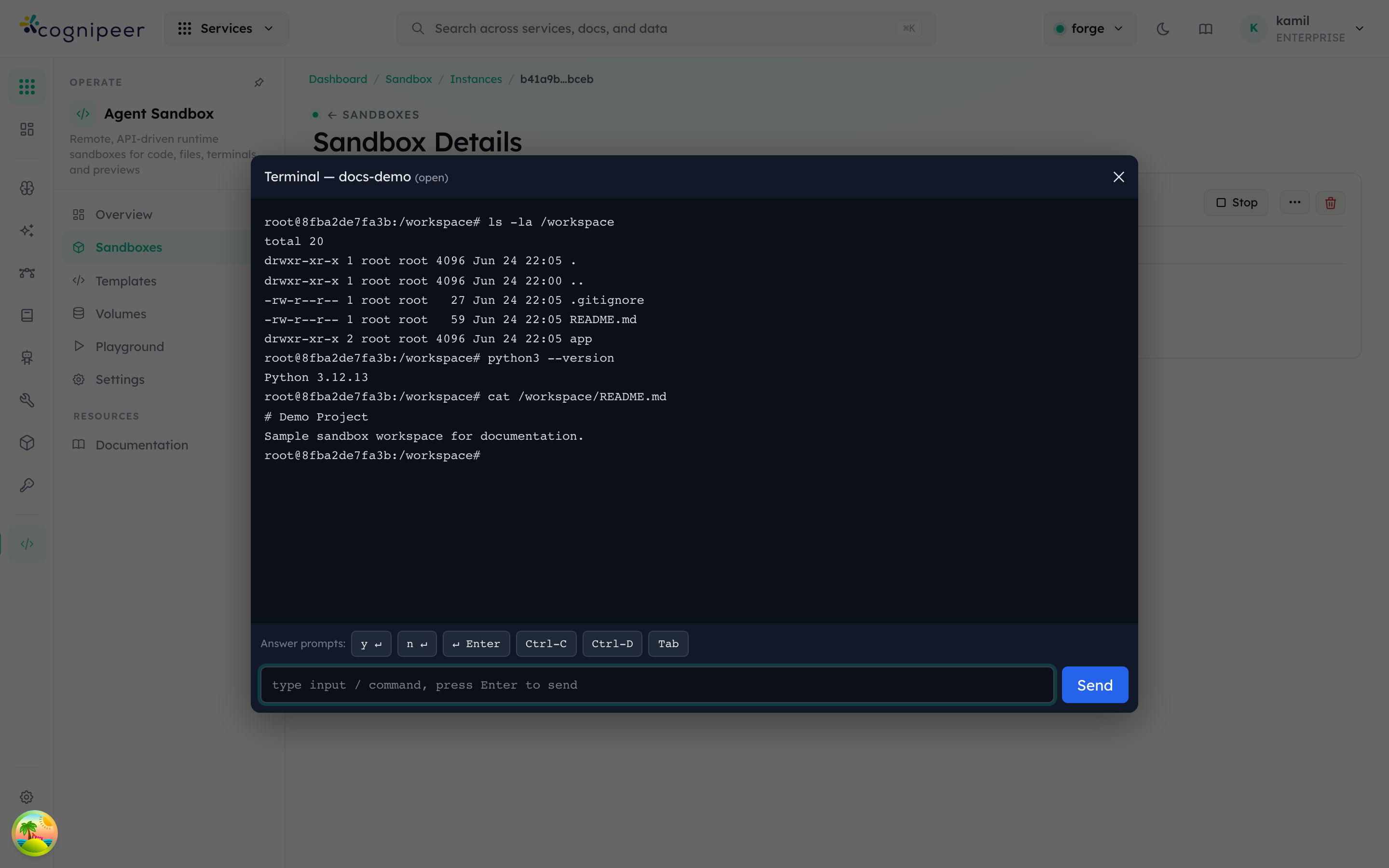
Sessions auto-close after the configured TTL (default 1 hour). A sandbox must be Started to open one.
Filesystem
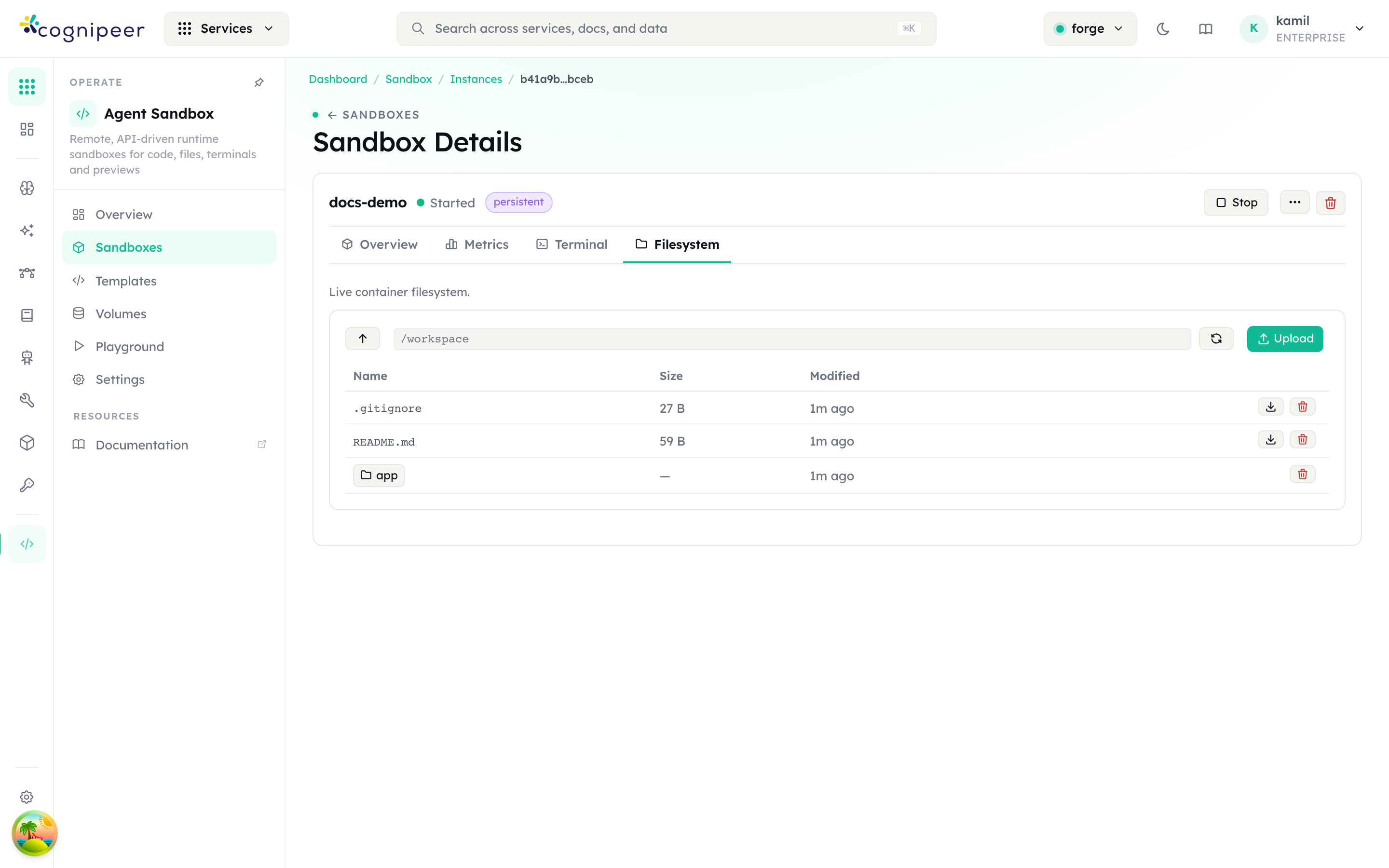
A live browser of the container filesystem (served through the in-container toolbox). When the sandbox has an attached volume, /workspace is that volume; otherwise it is the container's ephemeral disk. You can navigate directories, upload files, and download or delete entries. When a sandbox is stopped but has a volume, the same tab browses the persisted object store instead.
Templates
Templates lists the base images new sandboxes launch from. Each row shows the key, display name, image, runtime, and isolation level.
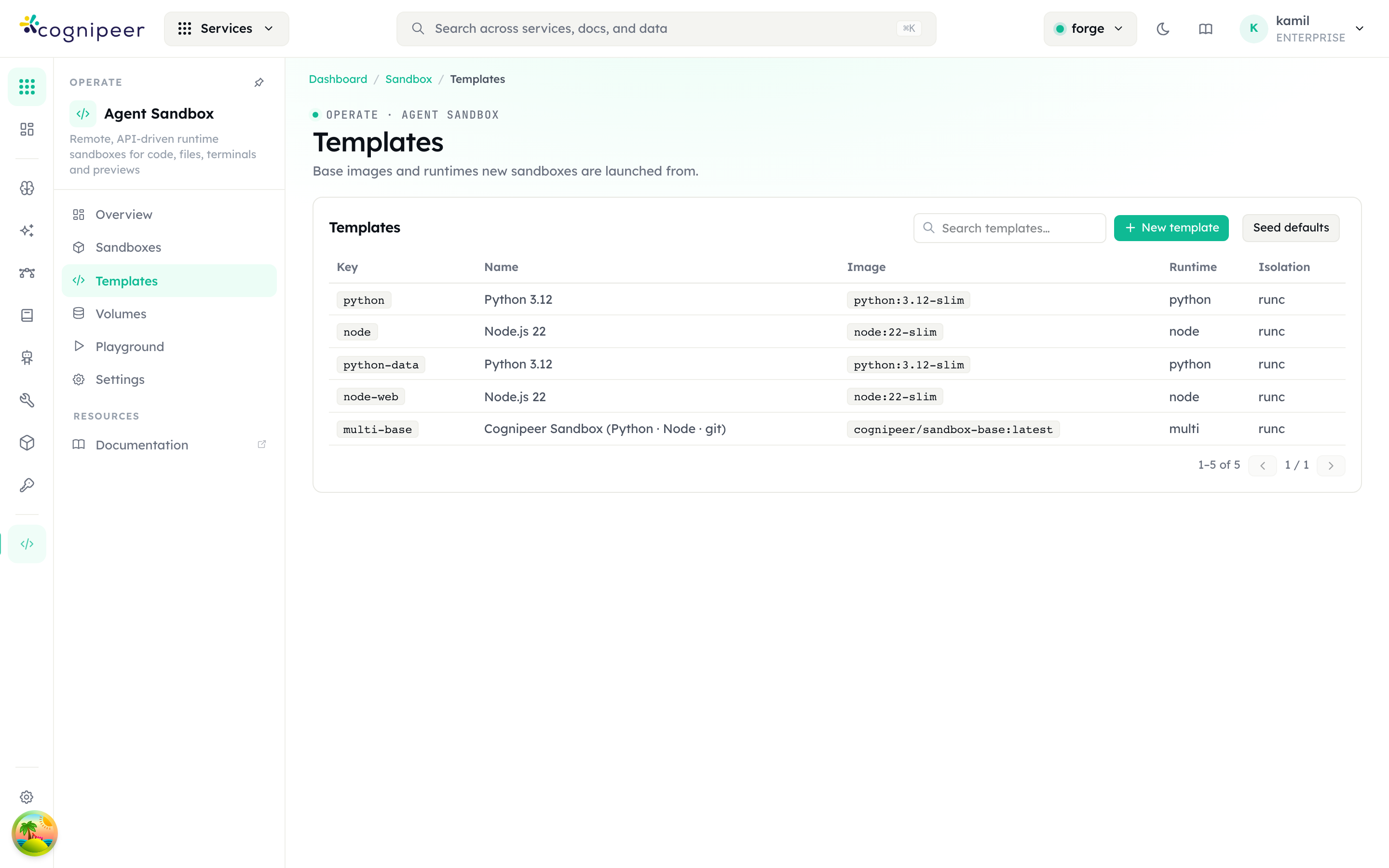
- New template registers a custom recipe — base image, runtime, isolation, default resources, env, entrypoint, and the toolbox port (default
8787). - Seed defaults idempotently loads the built-in library (Python, Node, data-science, web, and the multi-runtime
cognipeer/sandbox-baseimage). - Each row has Edit (update the recipe in place — the
keystays fixed since other config resolves it by it) and Delete. - Templates are shared by every project of the workspace, so creating, editing, deleting and seeding them — and Promote to template on a sandbox — needs a workspace owner or admin.
Environment variables are sealed
The environment variables of a template and of a sandbox are encrypted at rest and write-only. Use them for secrets the sandbox needs (an API key for a tool the agent runs inside it).
- The API and the UI never return a value. A read shows each variable as
••••••plus the list of variable names (env_keys). - To change variables, send the map you want: a string replaces a value,
nulldeletes the variable, and the mask••••••(or leaving the key out whileenv_keysis kept) means unchanged. In the UI, each variable has a Replace action instead of a value you can edit. - Names must match
^[A-Za-z_][A-Za-z0-9_]{0,127}$, a value is at most 32 KiB, and a template or sandbox holds at most 100 variables. - If the encryption key changed, the stored values cannot be decrypted. A read then marks the template or sandbox
envUnreadable: true(the names stay, the values are gone) and the template editor shows a warning. A change that needs the stored values (a mask next to a new value,env_keys, a delete) is refused with409sandbox_env_unreadableand leaves the stored ciphertext alone; a change with only masks keeps it, and a value for every variable replaces it. In the UI a row opened with Replace and saved without a value keeps the stored value instead of storing an empty string. - Executors decrypt the values only when they start the container. Variables stored in plaintext by earlier versions are sealed the first time they are read.
An agent's own sandbox secrets (Build → Sandbox) follow the same rule, and Console takes extra care with them: text files the agent writes to /outputs are scrubbed of those secret values before they become attachments, the files that seed a sandbox are written without the agent's secrets in their environment, and published versions and manifest exports never include secret values. If Console cannot decrypt an agent's stored secrets (the encryption key changed), the sandbox tools still run, without the secrets, and say so in the tool result so the agent does not mistake a missing key for a bug in its command. Reading the agent shows config.sandbox.secretsUnreadable: true with an empty secrets list, and the Sandbox panel in Studio shows a warning. To recover, enter every secret again and save: a save that re-enters all of them replaces the unreadable ones, a save that sends only masked values keeps them as they are, and a save that mixes masked values (which would have to be kept) with new ones is refused with 409 sandbox_secrets_unreadable.
The multi-base template uses cognipeer/sandbox-base:latest, which bundles the toolbox/agent so the container stays alive and supports terminals, the filesystem browser, and git operations out of the box.
The web-e2e template (Web app + browser testing) uses cognipeer/sandbox-web-e2e:latest: the base image plus Playwright, Chromium and ffmpeg, so an agent can run an app, drive it in a headless browser and look at the result with read (a screenshot as an image, a recorded video as one contact sheet of frames, a PDF as text plus page images). Launch Chromium with --disable-dev-shm-usage: the sandbox /dev/shm is small. The image is built from docker/sandbox-web-e2e (scripts/build-sandbox-web-e2e.sh). A single Docker host that cannot pull it builds it on first use, on top of the base image, which takes several minutes; Kubernetes runners need it in a registry they can pull from.
The base image includes poppler-utils, which read uses for PDF page images; with an older base image read still returns a PDF's text.
Preloaded files (agent sandbox)
An agent's sandbox settings (Build → Agents → your agent → Build → Sandbox → Preloaded files) can carry files that are written into the sandbox automatically when it starts, before the agent works: for example a presentation template (.pptx).
- Click Add file (or drop files on the list) and type the destination path for each. The suggestion is
/workspace/templates/<file name>; parent folders are created for you. - Paths must be absolute, include the file name, be normalized (no
..,//,./), and must not be under/proc,/sys,/dev,/etc,/bin,/sbin,/usror/lib. Two files cannot share a destination. - Limits: 25 files, 25 MB each, 100 MB in total. The bytes are stored in the agent's attachments bucket (Build → Files) under
agent-assets/<agent key>/, so that bucket must be set up. - Works for both
sessionandephemeralsandboxes. A reused session sandbox only gets files that are missing or whose content changed (checked by SHA-256). - The agent's system prompt gets a "Preloaded files" list (path and name). If a file cannot be written the turn still runs: the failure is logged and the first command result carries a
noticenaming the files that are not available. - The files are listed under
config.sandbox.seedFiles. They are written without the agent's secrets in the environment (see Environment variables are sealed).
Environment variables from Config
Wherever you enter environment variables or secrets for a sandbox — a template, New sandbox, and an agent's Build → Sandbox (Environment variables and Secrets) — each row has a Value | Config switch. On Config you pick an item from the project's Config instead of typing the value.
- One item per variable — pick the item for a row, or use + Add from Config to tick several items at once; each gets a suggested name from its key (
cfg-openai-api-key→OPENAI_API_KEY), which you can change. - A whole group — bind a config group (Groups tab of + Add from Config, or Config groups on the agent): every item in it, now and later, becomes a variable named from its key.
- Precedence — a variable you set by name (typed value or a single item) wins over a bound group; between groups the first one wins. For a sandbox: template values < template Config values < sandbox values < sandbox Config values.
- Secrets on an agent — under Environment variables only non-secret items can be picked; secret items go under Secrets. Secret items of a bound group are passed like Secrets (per command, masked in output); the others are set like environment variables.
- Masking in agent output — an agent's tool output is masked for its Secrets and for the secret Config items its sandbox takes. Typed environment variables, on the agent or the template, are not masked: they are ordinary settings as often as not. Keep secret values in Secrets or in secret Config items.
Only the reference is stored, never the value. The value is read when it is used — when an agent run starts, or when a sandbox launches — in the project where it is used:
- A sandbox fails to launch with a clear message when a referenced item was deleted or belongs to another project.
- An agent run continues without a missing item, and the model is told which variables are unavailable.
- Templates that use Config values are not kept in the warm pool (warm machines belong to no project).
- Pointing a variable at a new item or group needs read access to Config in that project; re-saving references that are already stored needs nothing.
On the Config side, an item or group shows Used by — the agents and templates that read it — and deleting one warns about them first.
How a sandbox receives its environment
A sandbox's launch values — template and sandbox variables, typed or from Config — reach it in one of two ways. The installation picks one with SANDBOX_ENV_DELIVERY (Helm: sandbox.envDelivery); each sandbox keeps the way it was created with, so a change applies to sandboxes created afterwards.
legacy (default) | file | |
|---|---|---|
| Where the values are | On the container or pod spec, as in earlier versions | In /run/cognipeer/env, a file in a memory-backed mount (tmpfs on Docker, a Memory emptyDir on Kubernetes), mode 0600, written after the sandbox starts |
| Container / pod spec and snapshot images | Hold the values | Hold none of them |
| Secret Config items | Cannot be bound; secret items of a bound group are left out | Supported, one by one or through a group |
| Runtime modes | All | docker and kubernetes (other modes stay legacy) |
With file delivery, commands, code runs, terminals and the console's own file and git operations load the file before they run, so programs see the same variables as before. If the sandbox loses the file — the engine restarted, the pod was recreated — the console writes it again before the next command. A volume cannot be mounted at /run/cognipeer. Terminals of these sandboxes do not save shell history.
With legacy delivery, a sandbox that already exists keeps starting when an item it uses is made secret later: the item is left out of its launch and a warning is logged. A new sandbox from the same template is refused until the item is unbound or the installation uses file.
Everything a sandbox receives is readable by the code that runs in it: give a sandbox only the values that code is meant to use.
A snapshot of a file sandbox carries its values (sealed) and Config references, so a restore or fork starts with them. A snapshot of a legacy sandbox restores as legacy, whatever the current setting, because its image holds the values.
On the token API, POST /api/client/v1/sandbox/sandboxes/:id/exec and /code accept env — { "NAME": "value" } for that command only, taking precedence over a launch value of the same name. Numbers and booleans are passed as strings. An env that is not an object, a name that is not a valid variable name, or a value containing a NUL byte, is refused with 400.
Volumes & snapshots
Volumes manages persistent storage and the snapshot archive on one page.
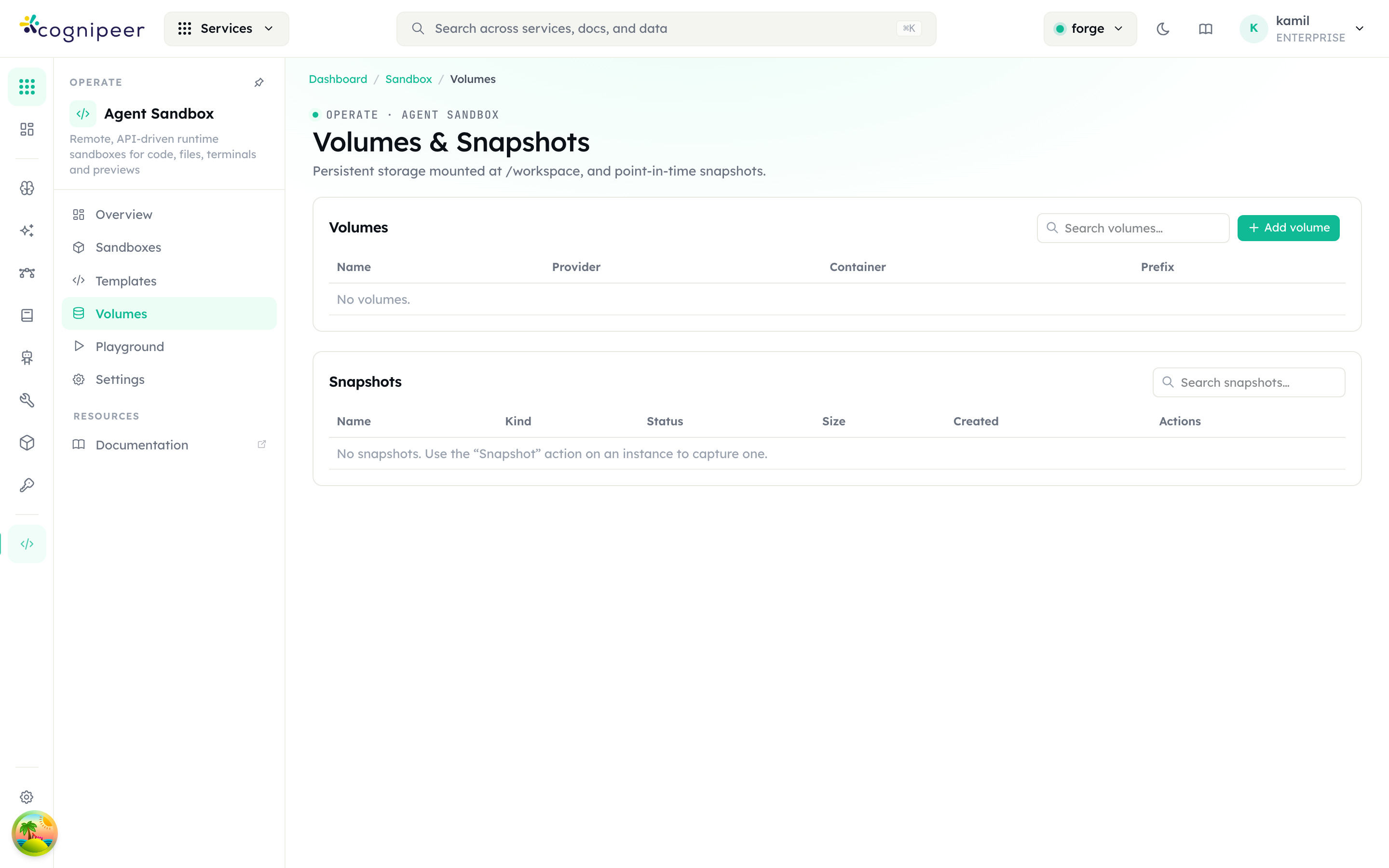
- Volumes are object-storage-backed workspaces. Each is created from a file bucket (which supplies the provider, container, and credentials) and shows its provider, container, and isolated prefix. Attaching a volume to a sandbox mounts it at
/workspace; detaching recreates the container without it. Volume data survives sandbox deletion. - Snapshots are point-in-time images. Use the Snapshot action on a running sandbox to capture one; a snapshot can be restored into a new sandbox or forked (snapshot + copy the volume data + launch an independent clone). A
backupsnapshot is additionally exported to object storage so it survives a runner restart.
Playground
The Playground is an interactive REPL bound to a running sandbox — pick a sandbox, then run code or shell commands and watch the output live.
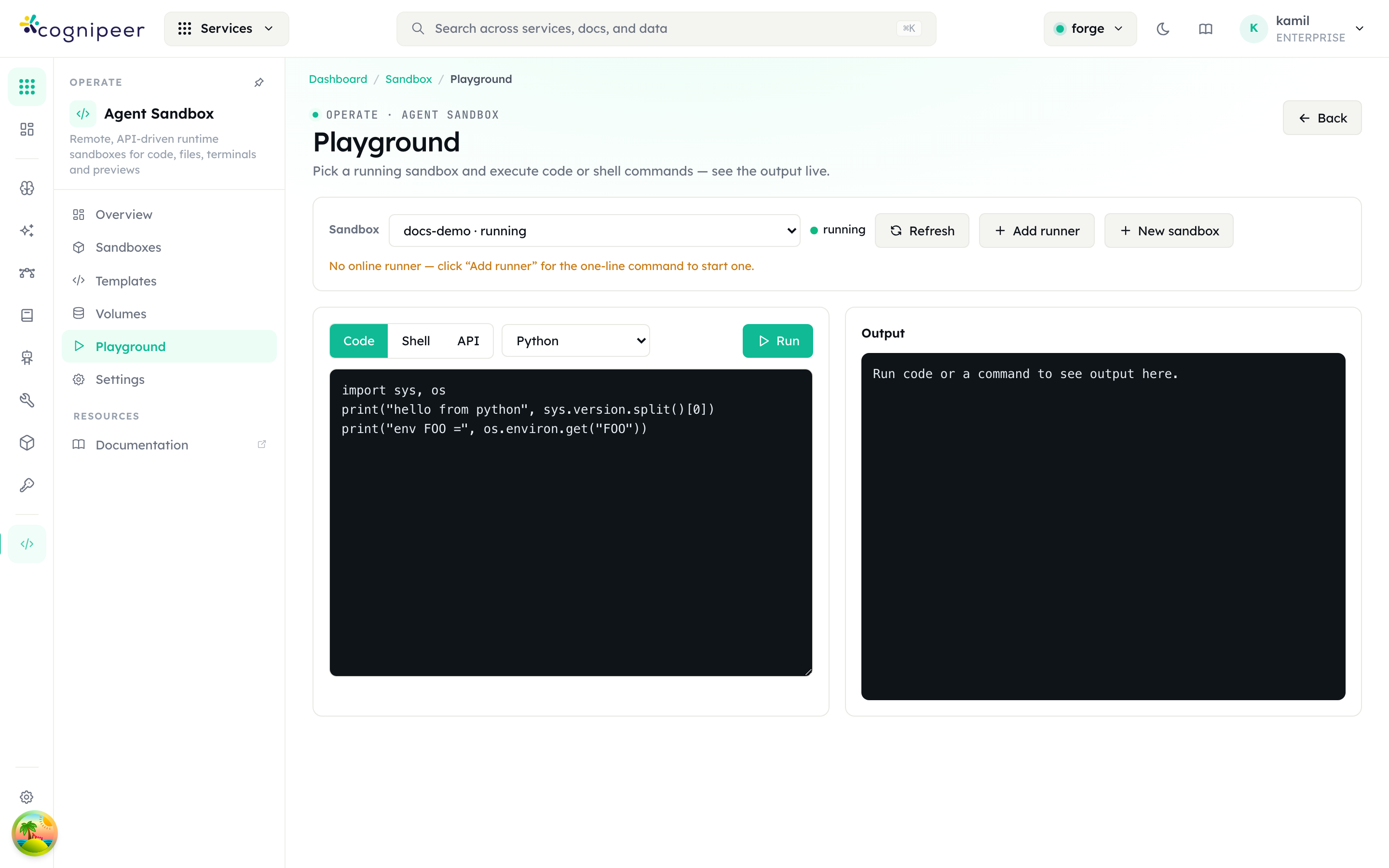
Switch between Code, Shell, and API modes, choose the language (Python / JavaScript / TypeScript / Bash), and press Run. It is the fastest way to confirm a sandbox is healthy and to prototype the exact exec / code calls an agent will make.
Settings
Settings holds the project-wide defaults and lifecycle policy.
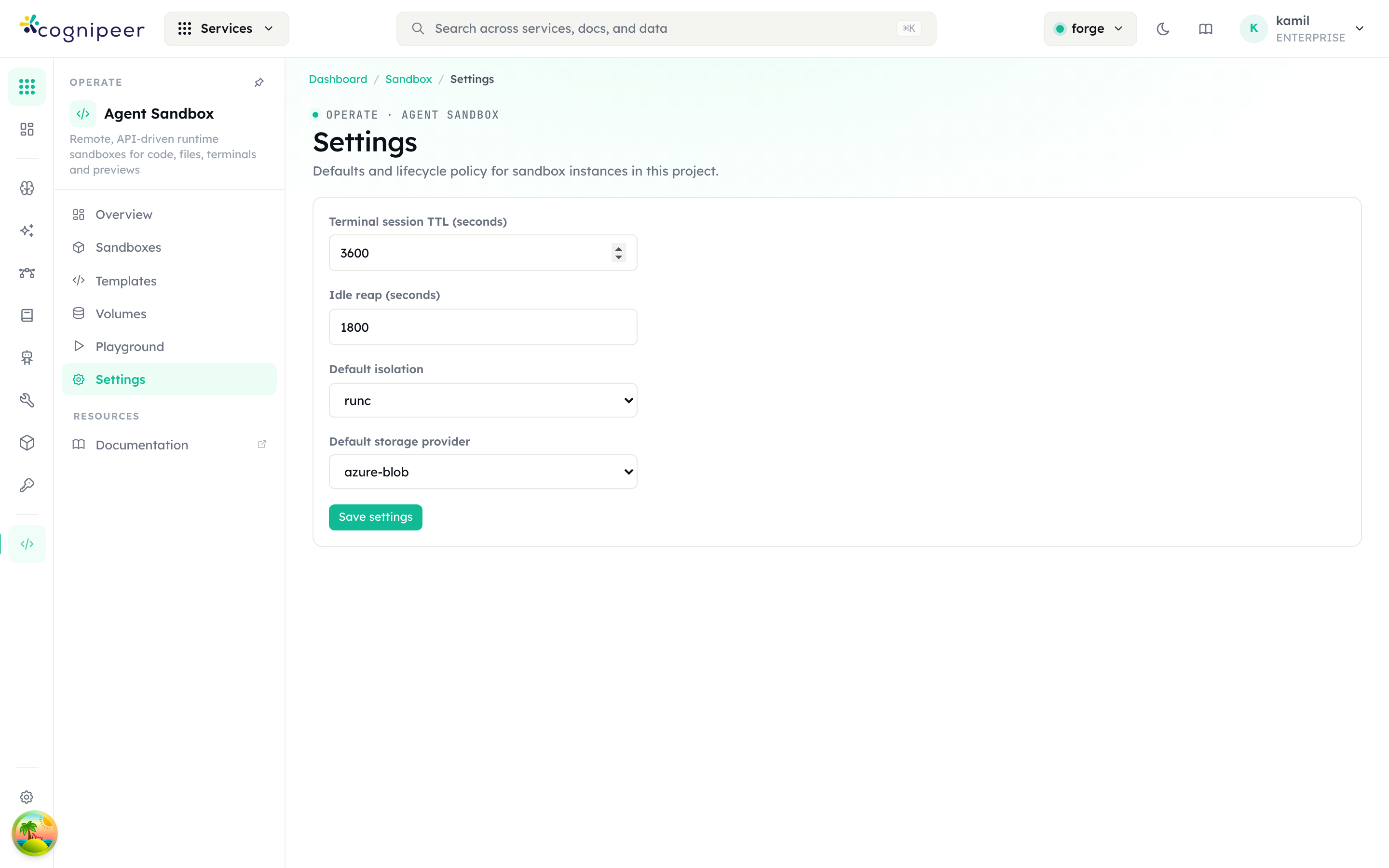
| Setting | Default | Effect |
|---|---|---|
| Terminal session TTL | 3600 s | How long an idle terminal session stays open before it is closed. |
| Idle reap | 1800 s | How long an ephemeral sandbox may sit idle before the reaper deletes it. Persistent sandboxes are exempt. |
| Default isolation | runc | Container isolation level applied to new templates (runc, gvisor, …). |
| Default storage provider | azure-blob | Object-storage backend used for snapshot backups and volumes (s3 or azure-blob). |
The reaper scans on a fixed interval and skips any sandbox that has a live terminal session, so an interactive session won't be pulled out from under you.
Resource limits
New sandboxes default to 0.5 vCPU / 1 GB RAM / 1 GB disk. The effective limit for a launch is resolved in layers — first defined wins per field, then clamped to the operator hard cap:
- Per-sandbox — the Resources fields in the create dialog (or
resourcesin the API). - Per-project — the Project resource defaults card on the Settings page (stored against the active project).
- Platform default —
SANDBOX_DEFAULT_CPU/_MEMORY_MB/_DISK_MB/_PIDS(env), falling back to the built-in0.5 / 1024 / 1024 / 512. - Hard cap —
SANDBOX_MAX_CPU/_MEMORY_MB/_DISK_MB/_PIDS(env). Operator-owned; the UI and token API can never exceed it.0/unset = unbounded.
CPU and memory are always enforced by the container engine. Disk (diskMb) is enforced only when SANDBOX_DISK_QUOTA=on and the Docker storage driver supports --storage-opt size (overlay2 on xfs pquota, or btrfs); otherwise it is tracked and shown but advisory.
Runtime architecture
A sandbox is driven by a runner. The console never blocks on container work — it enqueues a command and reconciles state from the events the runner reports back.
┌────────────────────┐   enqueue command    ┌─────────────────────┐
│      Console       │ ───────────────────▶ │       Runner        │
│  (control plane)   │                       │   (data plane)      │
│                    │ ◀─── poll /commands ─ │  - docker run/exec  │
│  command queue     │ ──── events ────────▶ │  - commit / save    │
│  event ingestor    │                       │  - terminal PTY     │
│  reconcile / reaper│                       │  - FUSE volume mount│
└────────────────────┘ └─────────────────────┘Two execution models:
- Agent runner — an external process (remote Docker-in-Docker, a Kubernetes pod, or a fleet-managed host) handshakes with a one-time registration token, then long-polls the console for commands and posts events back. This is how the sandbox scales horizontally.
- Docker-direct — a synthetic in-console runner (
local-docker-direct) that executes commands against the local Docker daemon in-process. Ideal for single-host and self-hosted setups; limited to local docker volumes (no cloud-volume FUSE mount or snapshot export).
Supporting loops keep the system consistent:
- Reconcile runs once at boot: it re-spawns console-managed runners and re-drives any sandbox that should be running, clearing stuck
pendingstates after a restart. - Reaper runs periodically: it deletes ephemeral sandboxes once idle (per-template → tenant → config window) and leaves persistent ones alone.
- Command queue is FIFO per runner, so dependent operations (e.g. detach-then-recreate for a volume change) always execute in order.
Agent conversation lifecycle
When an agent is configured to use the sandbox, the default lifecycle is now one sandbox per active conversation session rather than one fresh sandbox per turn. A follow-up turn in the same conversation reuses the existing sandbox while it is still available, which keeps in-sandbox state such as installed packages, generated files, and working-directory changes available across turns.
That reused sandbox is not permanent: once it goes idle long enough to be reaped, the next turn starts a new sandbox. If your workflow needs state to survive beyond the idle window, use the sandbox's own persistent mechanisms such as volumes or snapshots rather than relying on the conversation session alone.
API surface
Every screen above is backed by the /api/sandbox/* admin API (cookie-authenticated, RBAC service sandbox). The most-used endpoints:
| Method & path | Purpose |
|---|---|
GET /api/sandbox/instances | List sandboxes |
POST /api/sandbox/instances | Create a sandbox |
POST /api/sandbox/instances/:id/start · /stop | Start / stop |
DELETE /api/sandbox/instances/:id | Delete |
POST /api/sandbox/instances/:id/exec | Run a shell command, return exit/stdout/stderr |
POST /api/sandbox/instances/:id/code | Run a code block (python/javascript/typescript/bash) |
POST /api/sandbox/instances/:id/terminal | Open a terminal session (returns a WebSocket path) |
GET /api/sandbox/instances/:id/preview | Preview state: enabled/public/allPorts + suggested ports |
GET /api/sandbox/instances/:id/preview-listening | Ports currently LISTENing inside the sandbox |
PATCH /api/sandbox/instances/:id/preview | Toggle preview {enabled, public} |
ALL /api/sandbox/instances/:id/preview/:port/* | Proxy to a port inside the sandbox (authenticated) |
POST /api/sandbox/instances/:id/preview-tokens | Mint a session-less share link for a port |
ALL /api/sandbox/preview/:token/* | Public preview proxy (signed token, no session) |
GET PUT /api/sandbox/resource-config | Read / set the active project's resource defaults |
POST /api/sandbox/instances/:id/snapshot · /fork | Capture / clone |
POST /api/sandbox/instances/:id/volume · DELETE … | Attach / detach a volume |
GET POST /api/sandbox/templates · /templates/seed | Manage templates |
PATCH DELETE /api/sandbox/templates/:id | Edit / remove a template |
GET POST /api/sandbox/volumes · /volumes/:id/files | Manage volumes and volume files |
GET /api/sandbox/snapshots · /snapshots/:id/restore | List / restore snapshots |
GET PUT /api/sandbox/settings | Read / update project settings |
Template and sandbox writes (POST /api/sandbox/templates, PATCH /api/sandbox/templates/:id, POST /api/sandbox/instances) take envRefs — { "NAME": { "configId": "…" } } or { "configKey": "…" } — and groupRefs — [{ "groupId": "…" }] or [{ "groupKey": "…" }] — next to env; responses return them as stored ({ configId, key, groupId } / { groupId, key }). On a template PATCH a field that is sent replaces the whole map/list (null, {} or [] clears it) and a field that is left out is kept. A name set both in env and envRefs is refused (400); adding a new item or group without Config read is refused with 403 config_read_required.
A sandbox that takes values from Config needs read access to Config in its project, otherwise 403 config_read_required, on the admin API and the token API alike, for:
- running commands in it: exec, code, terminal, toolbox and file reads;
- copying it: snapshot and fork;
- using its volume: uploading to it, reading or writing its files, attaching it to another sandbox.
A caller without that access sees envRefs and groupRefs with ids only, without item and group names. Template writes, seeding and promote need a workspace owner or admin (403 tenant_admin_required).
A volume created from the dashboard belongs to the active project, and its file bucket and storage provider come from that project. Volumes bound to a project are listed and usable only from that project (another project's volume answers 404); volumes without a project, from earlier versions, stay workspace-wide. Reading volume files needs sandbox admin (403 sandbox_admin_required).
External runners use a separate bearer-token API under /api/sandbox/agent/:tenantSlug/* (handshake, heartbeat, commands, events), and terminals relay over WS /api/sandbox/terminal/:sessionId/browser.
Configuration
Beyond the in-app Settings, a few environment variables tune the runtime:
| Variable | Default | Purpose |
|---|---|---|
SANDBOX_EXECUTOR | agent | Execution model: agent or docker-direct. |
SANDBOX_IDLE_REAP_SECONDS | 1800 | Fallback idle window for ephemeral sandboxes. |
SANDBOX_SNAPSHOT_CONTAINER | cognipeer-sandbox | Default object-storage container for snapshot backups. |
SANDBOX_BASE_IMAGE | — | Override the base image used for the multi-runtime template. |
SANDBOX_CONSOLE_URL | http://localhost:$PORT | Callback URL advertised to console-managed runners. |
SANDBOX_PREVIEW_PORTS | 3000,5173,8000,8080 | Ports published for preview (comma list; a-b ranges allowed). |
SANDBOX_PREVIEW_PROXY_HOST | auto | Host the published ports are reached at. Auto-derived from DOCKER_HOST (tcp://host:… → host), else 127.0.0.1. Set when the console can't reach the engine host directly. |
SANDBOX_PREVIEW_SECRET | — | HMAC secret enabling session-less share links. Unset = sharing disabled (authenticated preview still works). |
SANDBOX_DEFAULT_CPU / _MEMORY_MB / _DISK_MB / _PIDS | 0.5 / 1024 / 1024 / 512 | Platform default resource limits for new sandboxes. |
SANDBOX_MAX_CPU / _MEMORY_MB / _DISK_MB / _PIDS | — | Hard upper bound per field (0/unset = unbounded). Clamps every launch. |
SANDBOX_DISK_QUOTA | off | on enforces diskMb via --storage-opt size (needs xfs-pquota / btrfs); otherwise disk is advisory. |
SANDBOX_ENV_DELIVERY | legacy | file gives new sandboxes their launch values through an in-memory file instead of the container spec, and allows secret Config items; see How a sandbox receives its environment. |
SANDBOX_WORK_ROOT | <tmpdir>/cognipeer-sandbox | Working directory of the Docker runtime (snapshot tarballs). Created owner-only; point it at a dedicated volume in containers. |
SANDBOX_NETWORK_MODE | — | docker run --network for sandboxes (none blocks networking). host and container:<name> are not accepted for new sandboxes; a sandbox that exists keeps the network it was created with. |
Security & tenant isolation
- Every request is bound to the calling tenant's database for the full async execution, preventing cross-tenant reads under concurrency.
- Runner agents authenticate with hashed tokens: a one-time registration token (
sbref_…) exchanged at handshake for a long-lived agent token (sbat_…), compared in constant time and rotatable from the UI. - Block network access removes outbound connectivity for a sandbox; the isolation level (
runc,gvisor, …) governs container-to-host isolation. - Preview share links are HMAC-signed capability tokens scoped to a single instance + port with a short TTL — anyone with the link reaches only that one port, and only until it expires. Sharing is off unless
SANDBOX_PREVIEW_SECRETis set. The authenticated preview proxy stays bound to the caller's session and project. - Launch values stay off the container spec with
filedelivery — they live in a memory-backed file inside the sandbox and are not written to snapshot images; see How a sandbox receives its environment. - Config access carries over to sandboxes. Running commands in, or reading files of, a sandbox that takes values from Config needs Config read access in its project; templates, which every project shares, are changed by workspace owners and admins only.
- Git credentials are used for one operation. A username and password or token given to clone, pull or push authenticate that operation only, so pass them again on each pull or push. They are not written into the repository's configuration or kept by the console, and they are offered only to the host being cloned from, or to
origin's host on pull and push, never to another host a redirect or submodule points at. While they are in use, repository hooks do not run, except Git LFS'spre-push. - Agent tool output is masked for the agent's Secrets and the secret Config items its sandbox takes, including their shell-quoted form and, for a value of several lines such as a key, each of its lines.
- Terminal history is not saved in sandboxes with
filedelivery: their terminals start withHISTFILE=/dev/null.legacysandboxes keep their shell history as before. - Error messages are cleaned of environment values and URL credentials before the API returns or logs them.
- Sandbox environment variables are sealed and masked on edit. The edit flows treat them as write-only secrets rather than a readable settings field, so operational procedures should store the source value elsewhere if they need to rotate it later — or keep the value in Config and reference it (Environment variables from Config), so a rotation in Config reaches every sandbox launched after it.
Where to go next
- File Storage — the buckets that back sandbox volumes and snapshot exports.
- Multi-Tenancy — how the per-request tenant binding the sandbox relies on works.
- Licensing — enabling enterprise modules.