

Providers
The provider system is a contract-driven abstraction that supports multiple AI service providers (OpenAI, Anthropic, Google, AWS Bedrock, Pinecone, Qdrant, etc.) through a unified interface. Provider definitions live in code; the operator-facing surface for configuring them is Configure → Providers in the console.
Operator view
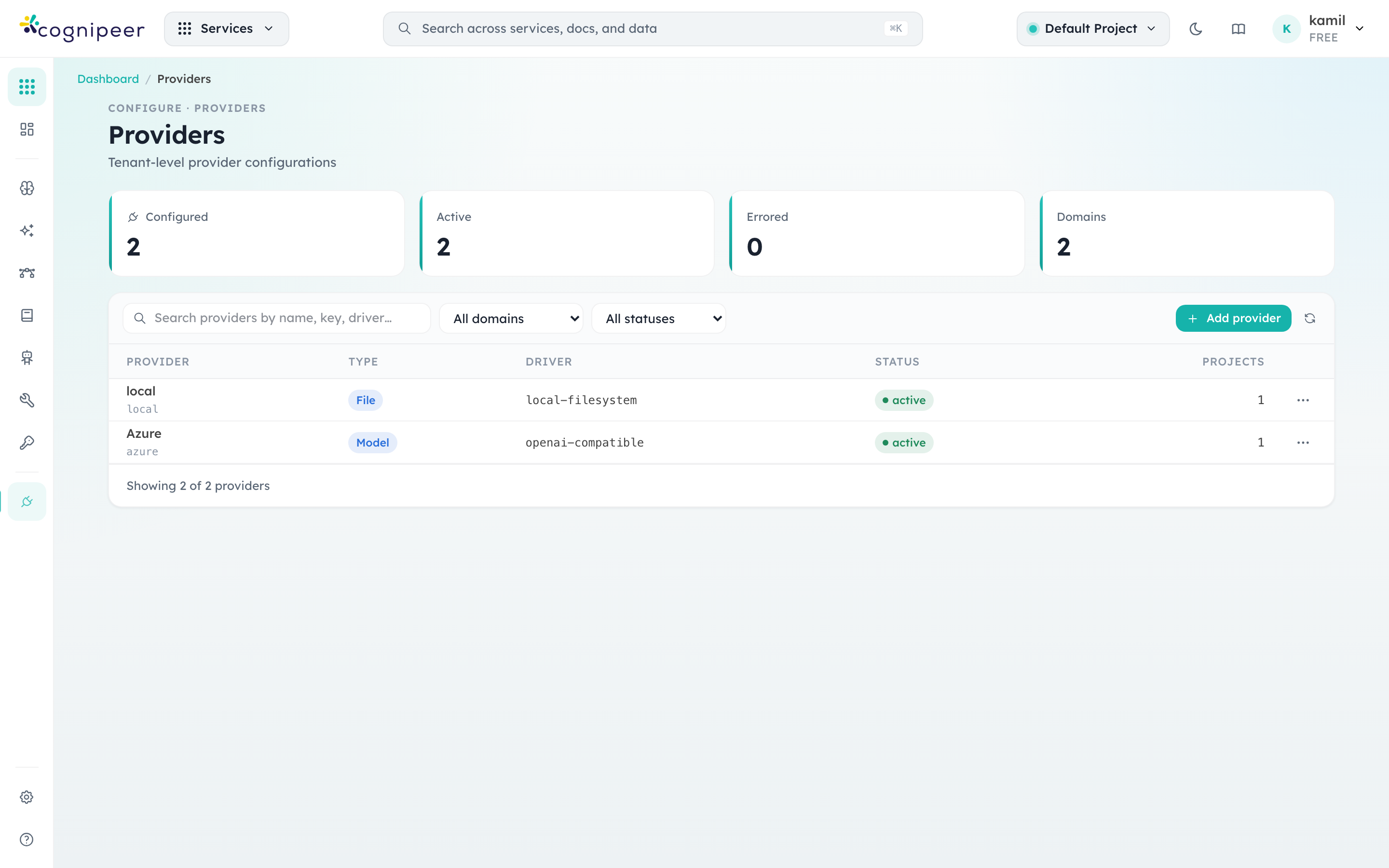
Every provider configuration shows up as a row in the providers screen, scoped to either the tenant or a single project. The four counter cards summarise the registry state at a glance: how many are configured, how many are active, how many are erroring, and how many distinct domains your tenant uses.
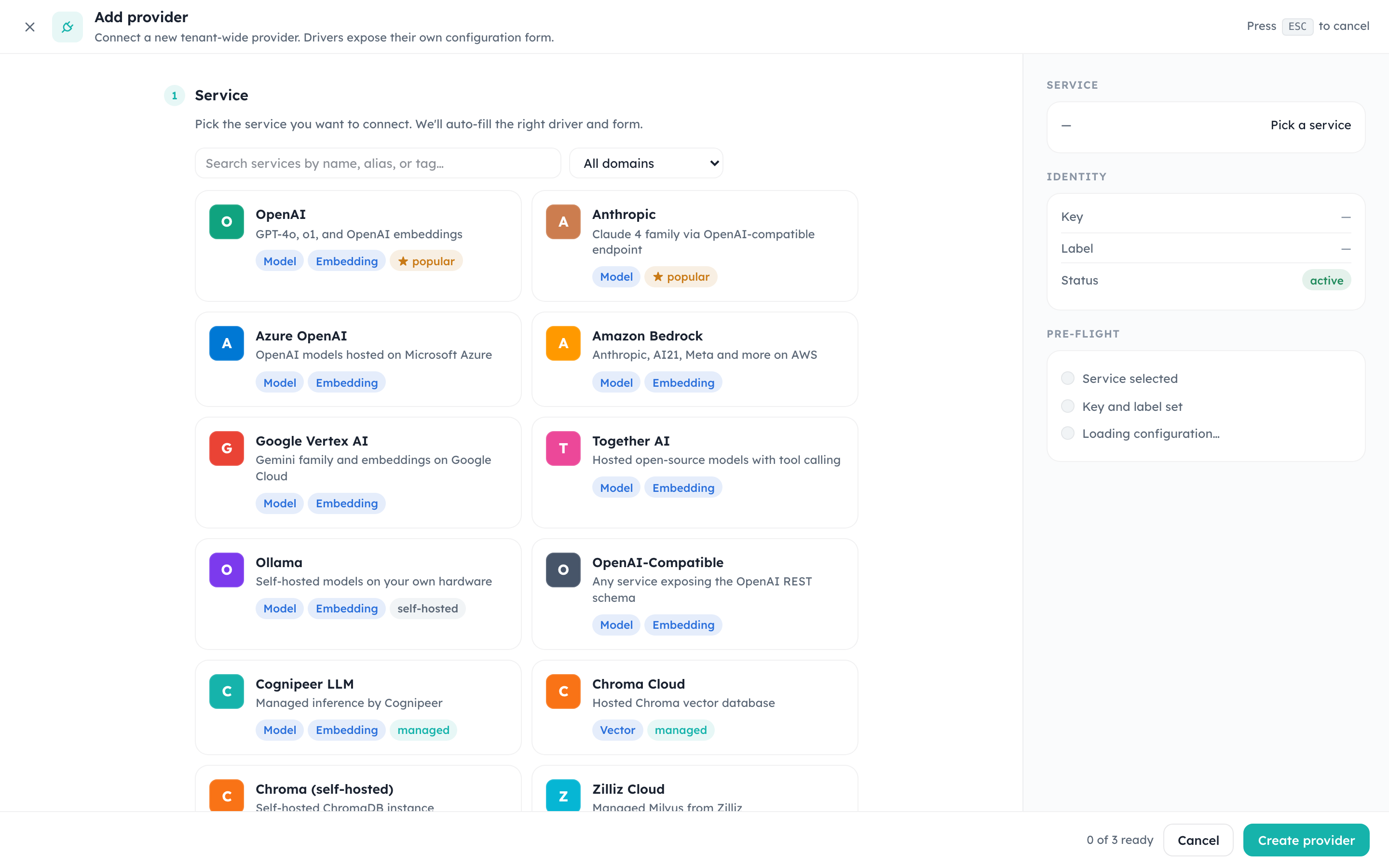
Adding a new configuration is a two-step flow. The first step lists every driver that's available in this build — provider contracts are compiled in, so seeing OpenAI, Anthropic, Bedrock, Vertex AI, Ollama, ChromaDB, Qdrant, and others here means the corresponding contracts are loaded.
The cards on the picker are not hard-coded. They come from src/config/service-catalog.json and are filtered through src/lib/services/serviceCatalog.ts. Multiple catalog entries can map to the same backend driver — e.g. Anthropic, Groq, and DeepSeek all surface as separate cards but resolve to the openai-compatible driver. See the Service Catalog guide for how to add or rebrand entries.
Use the domain filter dropdown to narrow the list — for example, when you're wiring up inference you typically only care about model domain contracts.
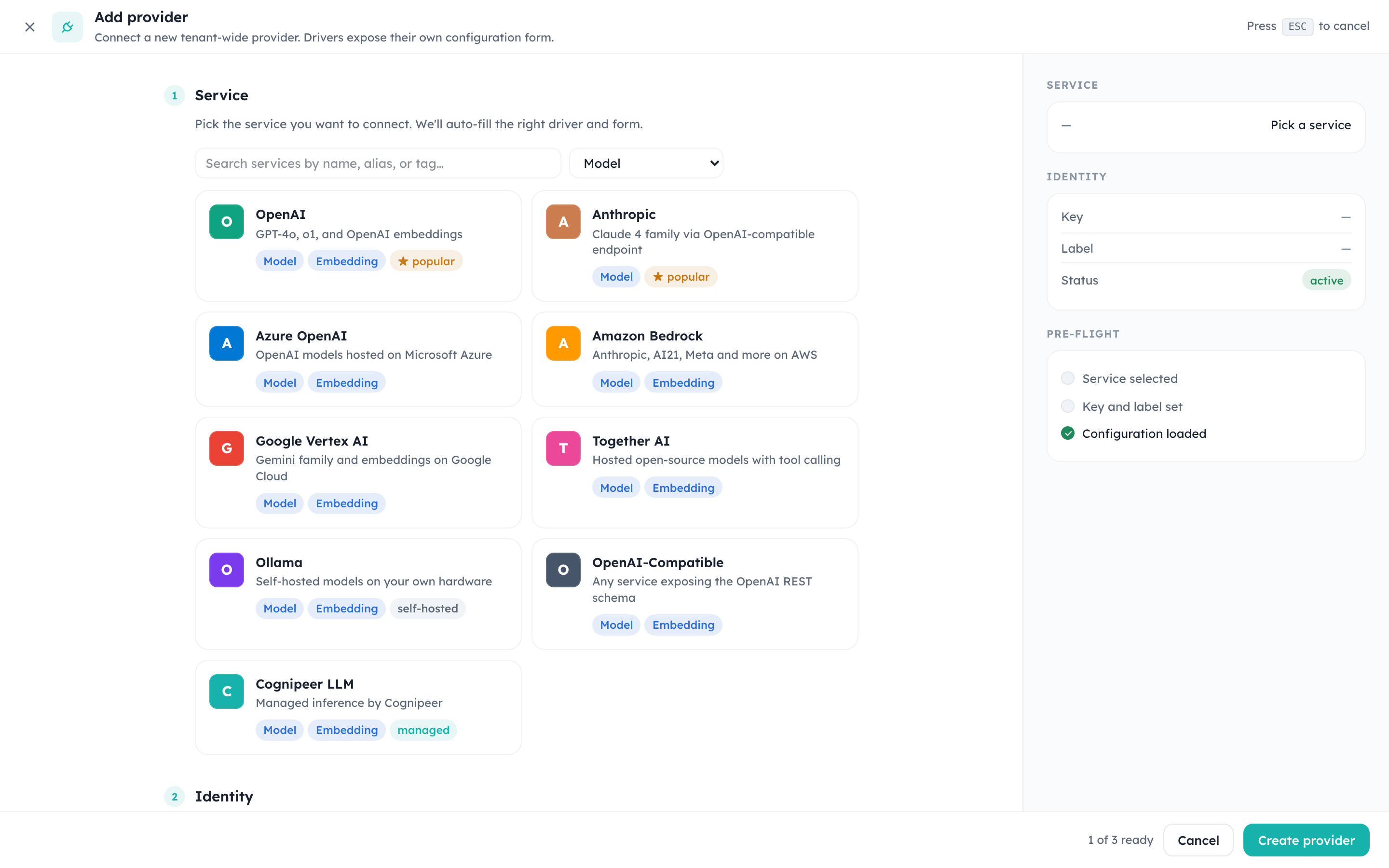
After picking a driver, the dialog auto-fills the right-hand panel and renders the credential and settings fields defined by the driver's contract. The PRE-FLIGHT checklist on the right turns green as each requirement is satisfied; the Create provider action only enables once the form is valid.
OpenAI-compatible servers
The openai-compatible driver talks to any server that mirrors the OpenAI REST schema. That covers hosted services (Groq, Mistral, DeepSeek) and servers you run yourself: Ollama, LM Studio, vLLM and similar. Together AI has its own card and the same OpenAI-schema behaviour.
| Field | Value |
|---|---|
| Base URL (required) | The server's OpenAI root, usually ending in /v1: http://ollama-host:11434/v1, http://lmstudio-host:1234/v1, http://vllm-host:8000/v1 |
| API key (required) | The server's key. A server without authentication still needs a value here; any placeholder such as ollama works |
| Organization (optional) | Passed through when the server uses one |
Then create a model on the provider and use the server's own model name as the Model ID. Things worth knowing:
- Chat Completions is the default Upstream API. Most self-hosted servers implement only that, so leave it unless the server documents
/responses. - Reasoning: servers that return
reasoning_content(orreasoning) on the message have that text passed through, subject to the model's reasoning visibility switches. The only reasoning control for this driver is on or off. - A private address such as
http://10.0.0.5:8000/v1is subject to the endpoint rules below.
Endpoint validation
Available from the next Console release
Save-time endpoint validation arrives with the next Console release. Earlier builds only apply the outbound guard when a request is made.
Console checks the endpoint a model provider points at when you save it, not only when a request is made. It covers the URL fields of the provider (baseUrl, endpoint and similar) for the model, embedding, image, speech, moderation and decision domains, on create and on update. An Azure instanceName must be a plain resource name, not a URL.
A refused endpoint returns HTTP 400 with code provider_endpoint_not_allowed and the field that failed:
{ "code": "provider_endpoint_not_allowed", "field": "baseUrl", "error": "Refusing outbound request to private/loopback host" }In the form the message reads "This endpoint is not allowed. Use a public http(s) address, or ask your administrator to allow private-network model endpoints." (On-prem it only appears when your administrator has explicitly blocked private networks.)
What is allowed depends on the deployment:
| Deployment | Rule |
|---|---|
| SaaS | Always enforced. Loopback, private (RFC 1918), link-local and cloud-metadata addresses are refused, with no setting to relax it |
| On-prem | Private and loopback endpoints are allowed by default, so a local Ollama or vLLM on 10.x or localhost works without any setting. They are refused only when OUTBOUND_HTTP_BLOCK_PRIVATE_NETWORK is explicitly true; hosts in OUTBOUND_HTTP_ALLOWED_HOSTS still pass |
On-prem settings (environment variables on the Console process):
| Variable | Default | Meaning |
|---|---|---|
OUTBOUND_HTTP_BLOCK_PRIVATE_NETWORK | unset (allowed) | Set true to refuse provider endpoints on private and loopback addresses |
OUTBOUND_HTTP_ALLOWED_HOSTS | empty | Comma-separated hostnames exempt from the block: exact names (ollama.internal) or .suffix entries (.corp.example) |
If you set the block to true, prefer the allow-list for the servers you need: it opens exactly the servers you name. The same guard protects other tenant-configured outbound calls, so the setting is shared; see Configuration.
The check also runs on each outbound request, including every redirect hop, so a public host cannot redirect Console into a private one.
Embeddings by provider
Embedding models are created on a provider that serves the embedding domain. Console calls the provider's native embeddings endpoint and records the usage the provider reports, with a character estimate as the fallback.
| Provider | Embeddings | Notes |
|---|---|---|
| OpenAI, OpenAI-compatible, Together | Yes | /embeddings. dimensions is honored for models that support shortening |
| Azure OpenAI | Yes | The model's deployment is used; the deployment must be an embeddings deployment |
| AWS Bedrock | Yes | Amazon Titan Text Embeddings and Cohere Embed |
| Google Vertex AI | Yes | text-embedding, multilingual and gemini-embedding models |
| Anthropic | No | Anthropic serves no embeddings. Use another provider for the vectors |
Architecture
ProviderContract          ProviderRegistry          Service Layer
  (definition)       →     (registration)       →    (runtime usage)

  id, version              listDescriptors()          createRuntime()
  domains                  getContract()              runtime.chat()
  display                  getFormSchema()            runtime.embed()
  form                                                runtime.query()
createRuntime()Provider Domains
Each provider contract declares which domains it supports:
| Domain | Interface | Operations |
|---|---|---|
model | ModelProviderRuntime | Chat completions, embeddings |
vector | VectorProviderRuntime | Index CRUD, vector upsert/query/delete |
file | FileProviderRuntime | Bucket management, upload/download |
datasource | (no runtime interface) | Domain value for external data connections; no runtime is instantiated |
Contract Structure
interface ProviderContract<TRuntime, TCredentials, TSettings> {
  id: string;                    // Unique identifier (e.g., 'openai')
  version: string;               // Semantic version
  domains: ProviderDomain[];     // Supported domains
  display: ProviderDisplayConfig; // UI label, description, icon
  capabilities?: Record<string, boolean>;
  form: ProviderFormSchema;      // Credential/settings form definition
  createRuntime(context: ProviderContext): TRuntime;
}Example Contract
// src/lib/providers/contracts/modelContracts.ts
export const openaiContract: ProviderContract<...> = {
  id: 'openai',
  version: '1.0.0',
  domains: ['model'],
  display: {
    label: 'OpenAI',
    description: 'GPT-4, GPT-3.5, DALL-E, Whisper',
    icon: 'openai',
  },
  form: {
    sections: [
      {
        title: 'Credentials',
        fields: [
          { name: 'apiKey', label: 'API Key', type: 'password', required: true, scope: 'credentials' },
        ],
      },
    ],
  },
  createRuntime(context) {
    return new OpenAIRuntime(context);
  },
};Provider Registry
The singleton registry manages all contracts:
import { providerRegistry } from '@/lib/providers/registry';

// List available providers for a domain
const drivers = providerRegistry.listDescriptors('vector');

// Get form schema for UI rendering
const schema = providerRegistry.getFormSchema('postgres');

// Create runtime instance
const runtime = providerRegistry.createRuntime('openai', context);Contracts are auto-registered from CORE_PROVIDER_CONTRACTS on first access (lazy initialization).
Provider Configuration Lifecycle
1. Discovery
// List available vector drivers
const drivers = await listVectorDrivers();
// Returns: [{ id: 'sqlite-vector', display: {...} }, { id: 'postgres', ... }]2. Configuration
// Create a provider config for a tenant
await createVectorProvider({
  tenantDbName, tenantId, projectId,
  driver: 'postgres',
  name: 'Production Vectors',
  credentials: { connectionString: 'postgres://...' },
  settings: { schema: 'public' },
});Credentials are encrypted with PROVIDER_ENCRYPTION_SECRET before storage.
3. Runtime Usage
// Load stored config and create runtime
const { runtime, index } = await buildRuntimeContext(tenantDbName, providerKey);
const results = await runtime.query(indexName, queryVector, { topK: 10 });Form Schema
The form schema drives the UI for configuring providers:
interface ProviderFormField {
  name: string;
  label: string;
  type: 'text' | 'password' | 'textarea' | 'number' | 'select' | 'switch';
  required?: boolean;
  scope?: 'credentials' | 'settings' | 'metadata';
  placeholder?: string;
  description?: string;
  options?: Array<{ label: string; value: string }>;
}The ProviderFormRenderer component auto-renders forms from this schema.
Adding a New Provider
- Create contract under
src/lib/providers/contracts/:
export const myProviderContract = {
  id: 'my-provider',
  version: '1.0.0',
  domains: ['model'],
  display: { label: 'My Provider' },
  form: { sections: [...] },
  createRuntime(ctx) { return new MyProviderRuntime(ctx); },
};- Register in
CORE_PROVIDER_CONTRACTS:
export const CORE_PROVIDER_CONTRACTS = [
  ...existingContracts,
  myProviderContract,
];Implement runtime with the domain interface (e.g.,
ModelProviderRuntime)Test that the form renders in the UI and the runtime works correctly
Stored Configuration
Provider configs are stored in the tenant database as IProviderRecord:
| Field | Description |
|---|---|
key | Unique provider key per tenant |
type | Provider domain |
driver | Contract ID |
label | Display name |
credentialsEnc | Encrypted credentials |
settings | Provider-specific settings |
status | active, disabled, or errored |