

App surfaces
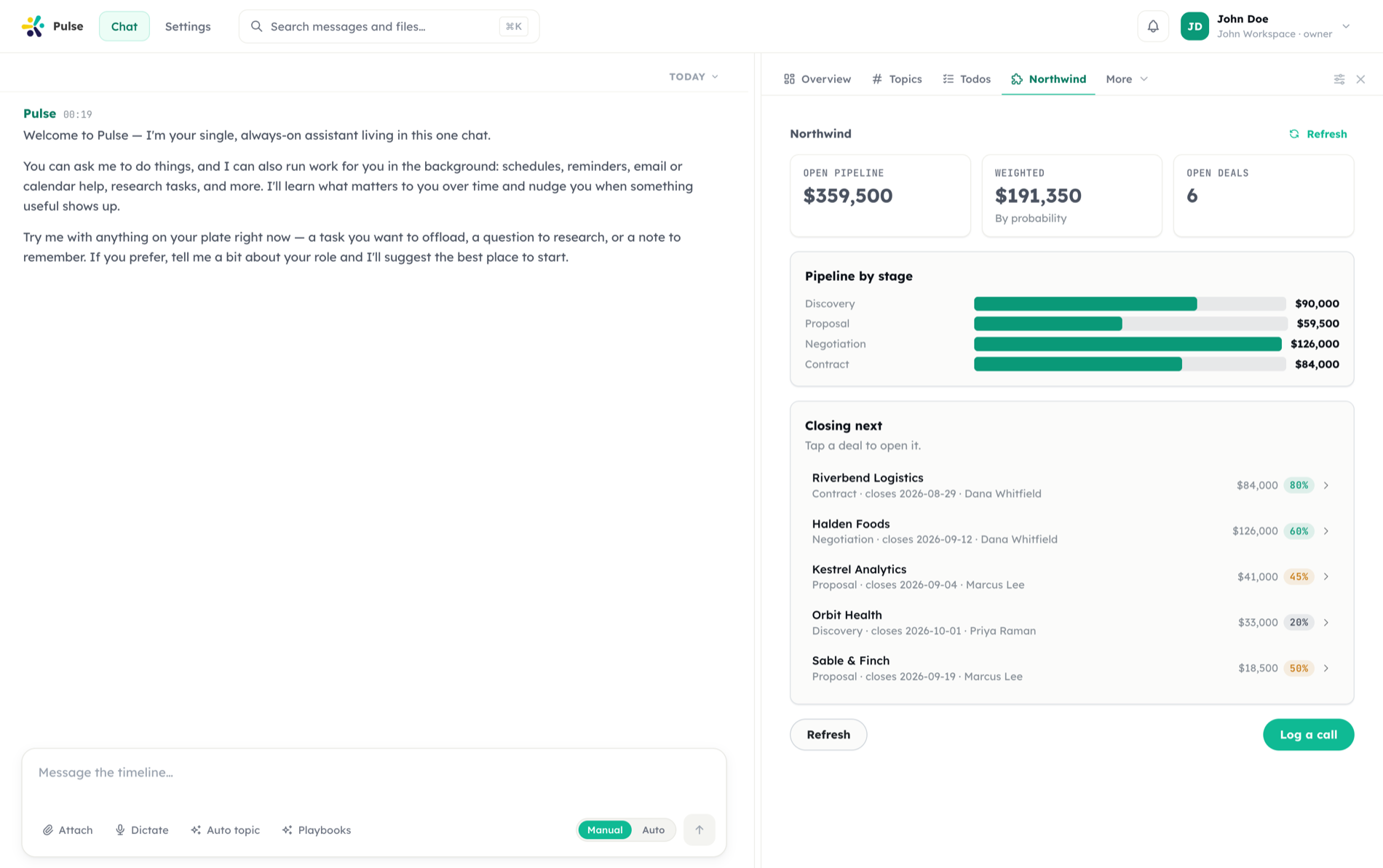
A side panel that is genuinely part of the app. Pulse fetches it from the app on demand, renders it from a declarative spec, and sends its button presses and form submits back — signed, credential-injected, and never through the user's browser.
Server-side, always
The member's token is decrypted at call time and never leaves the server. The browser sees rendered output, not credentials.
A spec can never name a URL
Buttons carry an action id. Pulse resolves the destination from the installed manifest, so a spec cannot point a user's session anywhere.
Signed like Slack
Every interaction carries an HMAC over timestamp and body, so an app can tell a real Pulse call from anything else holding a token.
This page documents the protocol — what an app declares, what Pulse sends, what it accepts back, and every check in between. For the user-facing view of panels, see Apps. For authoring the manifest that declares one, see Building apps.
The shape of a surface
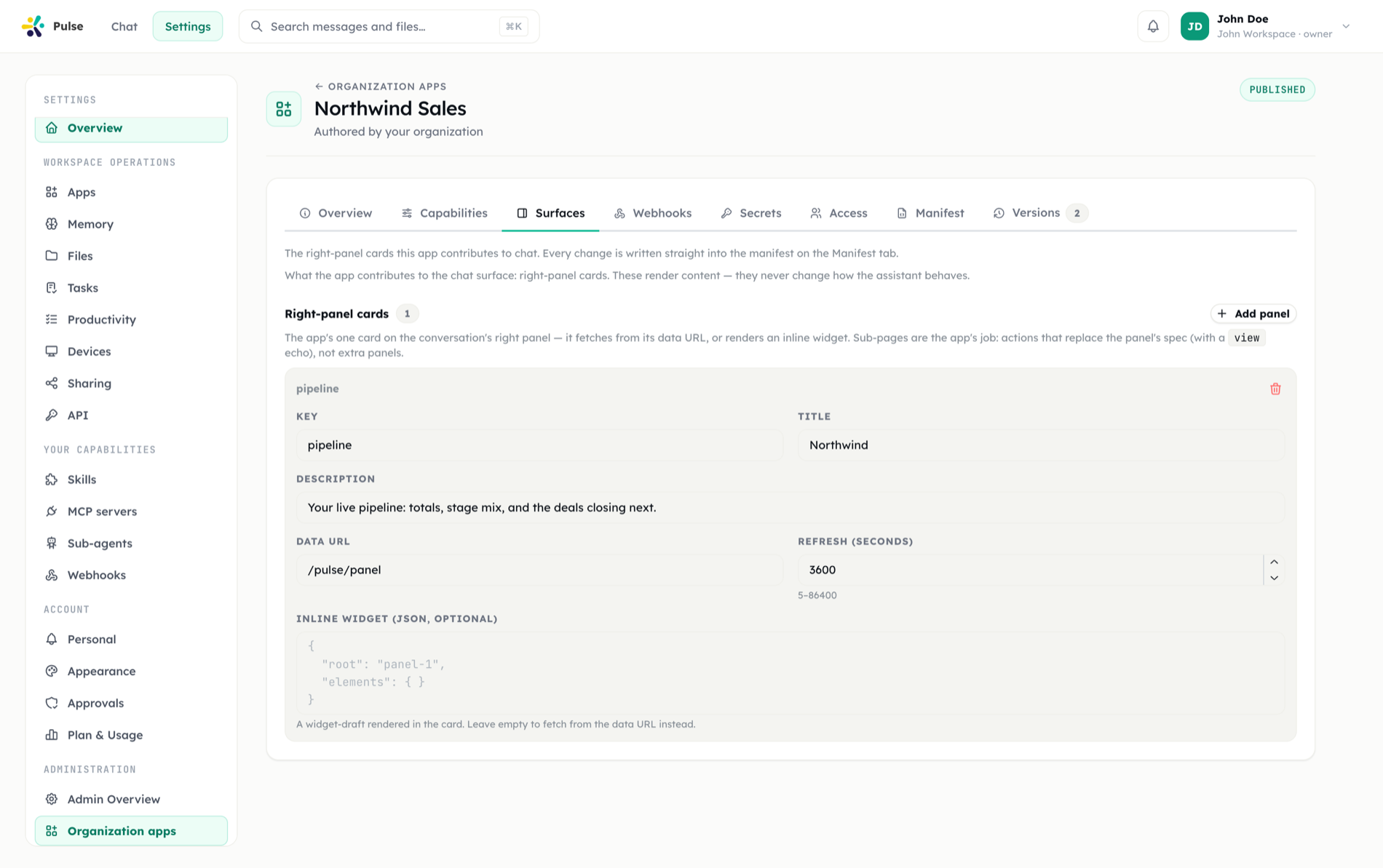
A manifest declares at most one right panel per app, plus one interactivity endpoint for the whole app:
{
  "capabilities": {
    "surfaces": {
      "rightPanel": [
        {
          "key": "expenses",
          "title": "Expenses",
          "description": "Your open expense reports",
          "dataUrl": "/pulse/panel",
          "ttlSeconds": 60
        }
      ],
      "interactivity": { "url": "/pulse/action" }
    }
  }
}Two limits are design decisions rather than arbitrary caps:
- One panel per app. Sub-pages live inside the panel, through in-panel navigation, so a second panel would be an information-architecture decision — not a way to add a screen.
- One interactivity endpoint per app, not per panel. The action id already discriminates, and an app that had to publish a URL per surface would need a manifest revision just to add a button.
A panel with a static widget and no dataUrl is legal and renders without ever calling the app. ttlSeconds bounds caching between 5 seconds and 24 hours; the default is 60.
Why the server, and not the browser
Both calls to the app come from Pulse's server, never from the user's browser. Three reasons, each of which is a rule the rest of the app platform already lives by:
- The user's managed-auth token must be injected. It is decrypted at call time and never leaves the server — a browser fetch would have to hold it.
- The destination must pass the SSRF egress guard against the app's own allowlisted origin. A browser cannot be made to honor that.
- The request must be signed, so the app can tell a real Pulse interaction from anything else holding a token.
Fetching a panel
Pulse issues GET {baseUrl}{dataUrl} with the member's credential injected exactly as the manifest's auth.inject block specifies — header or query parameter.
| Property | Value |
|---|---|
| Timeout | 12 seconds |
| Maximum response | 512 KB, enforced while streaming |
| Redirects | Not followed |
| Expected body | JSON — a surface spec |
Failure handling is explicit rather than silent:
- A 401 or 403 from the app becomes a connect first prompt to the member, not a raw error. Without a grant there is nothing to inject, so asking is the better answer than passing along the app's 401.
- Any other non-2xx becomes a 502 carrying the app's own status and the first 300 characters of its response — with every secret value redacted out of the text first.
- A non-JSON body is reported as such.
Which installation serves the panel
A member may be covered by a personal installation and an org-wide one. The rule is:
- Only
enabledinstallations are considered. - A personal installation wins — it is the member's own act and carries no audience.
- Otherwise the org-wide installation applies, but only if its audience covers this member.
Resolution matches the tool-binding rule exactly, because the member's grant hangs off one installation row — resolving a surface against a different row than the tools would make a connected app work on one surface and refuse on the other.
The audience check happens here, on the endpoint, not only in the panel list. Hiding the tab is not the same promise as refusing the data.
The component catalog
A surface spec is validated against a catalog that is deliberately separate from the one message widgets use.
| Catalog | Who may author it | Contents |
|---|---|---|
| Message widgets | The model, in its own reply | Read-only components |
| App surfaces | Only an app — its manifest or its signed action response | Read-only components plus forms and buttons |
That split is structural, not a rule someone has to remember: a button that fires a write against a third-party API must never originate from a sentence the model generated.
Read-only components: StackLayout, CardPanel, TextBlock, DataTable, StatGrid, NoticeCallout, KeyValueList, BarChart, LineChart, DonutChart.
Interactive components: ActionButton, ButtonRow, FormPanel, TextField, NumberField, SelectField, DateField, CheckboxField, HiddenField, DividerLine, BadgeRow, ListView, NavMenu.
A FormPanel names a state path — a JSON Pointer prefix its fields bind under. A submit button names the same path, which is how it knows which values to collect: one string ties a form to its button, with no implicit parent-child coupling in the spec.
ActionButton takes an optional confirm, and it is a string, not a boolean — the question is the whole point. "Are you sure?" trains people to click through; "Complete this effort report? The period will be locked." does not.
The action model
A spec never names a URL. A button carries an actionId from the app's own vocabulary, and Pulse resolves where to send it from the installation's manifest. A spec that could name its own endpoint would let anything that got a spec in front of a user make that user's browser — and credential — call anywhere.
Three action types:
| Action | Behavior |
|---|---|
submit | Collects a form's values and posts them to the app |
invoke | Fires an action with no form behind it |
openUrl | Handled locally by Pulse, host-checked at render time against the app's own origin |
The underlying renderer's built-ins (setState, pushState, removeState, validateForm) are available on top and need no declaration. A change event may only submit or invoke — binding openUrl to a change event is rejected.
Dispatching an action
Pulse issues POST {baseUrl}{interactivity.url} with this body:
{
  "actionId": "approve_report",
  "panelKey": "expenses",
  "values": { "note": "Looks fine" },
  "params": { "reportId": "r_123" },
  "view": { "key": "report", "params": { "id": "r_123" } },
  "interactionId": "b0f1…"
}and these headers:
| Header | Meaning |
|---|---|
X-Pulse-App | The app key |
X-Pulse-Timestamp | Unix seconds |
X-Pulse-Signature | v0=hex(hmac_sha256(secret, "v0:{timestamp}:{body}")) |
| auth inject | The member's credential, per the manifest's auth.inject |
Verifying the signature
The scheme is Slack's, deliberately — every integrator has implemented it once already.
- Read
X-Pulse-Timestamp. Reject anything older than a few minutes to close the replay window. - Build the base string
v0:{timestamp}:{raw request body}— the raw body, before any JSON parsing. - Compute
HMAC-SHA256with the app's signing secret and hex-encode it. - Compare
v0=<hex>againstX-Pulse-Signaturein constant time.
The signing secret is generated per app and can be rotated or removed by an admin from the app's page. interactionId is minted per action and is a natural idempotency key for a handler that must not double-execute.
The response contract
An action response is a JSON object. Every field is optional; an empty {} means "acknowledged, nothing to change".
| Field | Effect |
|---|---|
ok | false marks the interaction as failed |
toast | A short confirmation shown to the user |
message | A longer message |
errors | Field-level validation errors, mapped back onto the form |
close | Closes the current modal |
refresh | Re-fetches the panel from dataUrl |
spec | Replaces the panel's contents in place |
modal | { title, size, spec } — opens a modal |
panel | { title, spec } — replaces the whole panel including its title |
view | The app's "the user is now here" echo, stored client-side |
Everything coming back is re-validated
An action response is the least trusted document in the platform: generated per click, by a third party, in response to user input. So:
- Every returned spec is validated again, against the same catalog the manifest was validated against.
- A spec that fails validation is reported, not dropped. Silently discarding it is indistinguishable from an app that answered with nothing — the button spins, the panel does not change, and nobody can say why.
- The
viewecho is bounded: the key is capped at 120 characters, at most 12 parameters are kept, each key at 64 characters and each value truncated at 500. It is stored client-side and replayed into every later panel fetch, so it gets the same treatment as a spec.
Pulse only ferries view — the meaning of its key and params is entirely the app's own. It is sent with every action so a handler can re-render where the user actually is, and echoed back when an action navigates.
In-panel navigation
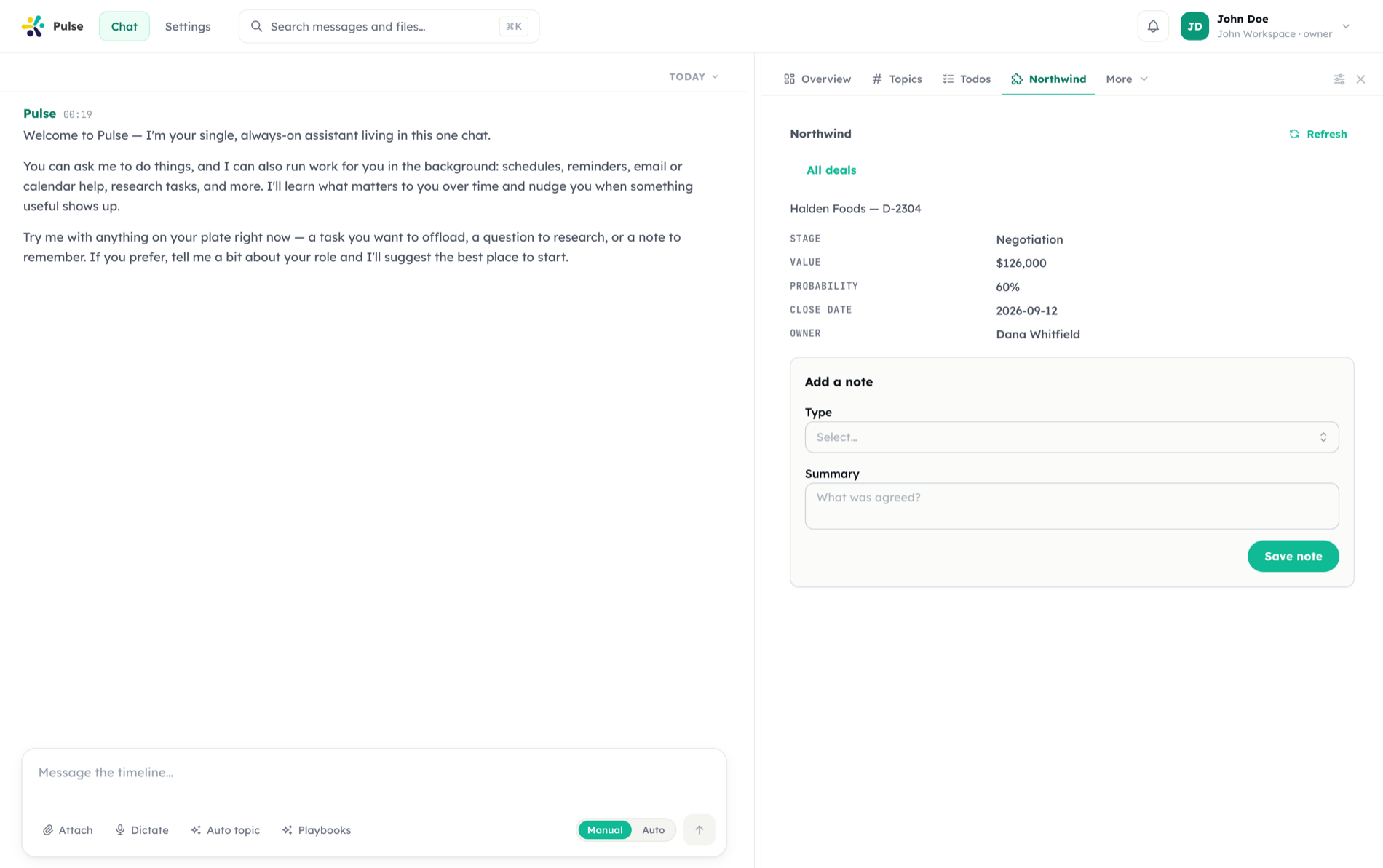
Because one app gets one panel, sub-pages live inside it. The mechanism is the pair above:
- A
ListViewrow or aNavMenuentry fires aninvokecarrying the record's parameters. - The app answers with a
spec(or apanel) for the sub-page, plus aviewnaming where the user now is. - Pulse renders the new spec and remembers the view.
- Every later fetch and action carries that view back, so the app can keep rendering the right screen — including after a
refresh.
Guardrails, collected
| Guardrail | Where it applies |
|---|---|
| Server-side only; the credential never reaches the browser | Both calls |
| Target must be the app's own origin or an allowlisted host | Both calls |
| Full SSRF egress check on the resolved address | Both calls |
| Redirects not followed | Both calls |
| 12-second timeout | Both calls |
| 512 KB response cap, enforced while streaming | Both calls |
| Secrets redacted from error text | Both calls |
| Audience re-checked on the endpoint | Both calls |
| Enabled-state check | Both calls |
| Payload signed with the app's secret | Actions |
| Specs validated against the app-surface catalog | Manifest and every action response |
view echo bounded and truncated | Action responses |
openUrl host-checked at render time | Client |
Related
- Apps — states, audiences, panels, and connecting
- Building apps — the manifest that declares a surface
- Security & governance — egress control and secret storage