

AI App Gateway
AI App Gateway is a control plane for AI coding-agent traffic — Claude Code, Codex, GitHub Copilot, and Cursor — leaving your network. It gives every team one controlled entry point: who is using these tools, what they send, and what they're allowed to do, without changing how a developer actually works (they keep using their own Claude Pro/Max or ChatGPT subscription; the gateway sits in front of it).
Enterprise module — replaces Aegis
AI App Gateway supersedes the retired Aegis enforcement plane for this specific job. It is not a general tool-enforcement engine — governing what an agent's own tools may do is now the community guardrail hook plane's tool_access family. See the September 2026 Enterprise release notes for the full migration story and the breaking-change notice for old Aegis integrations.
Overview
The landing page (Operate → AI App Gateway) lists every gateway in the tenant with rolling 7-day stats — active gateways, users, sessions, requests, tokens, and blocked count — plus a table of gateways with their team, mode, policy, and status.
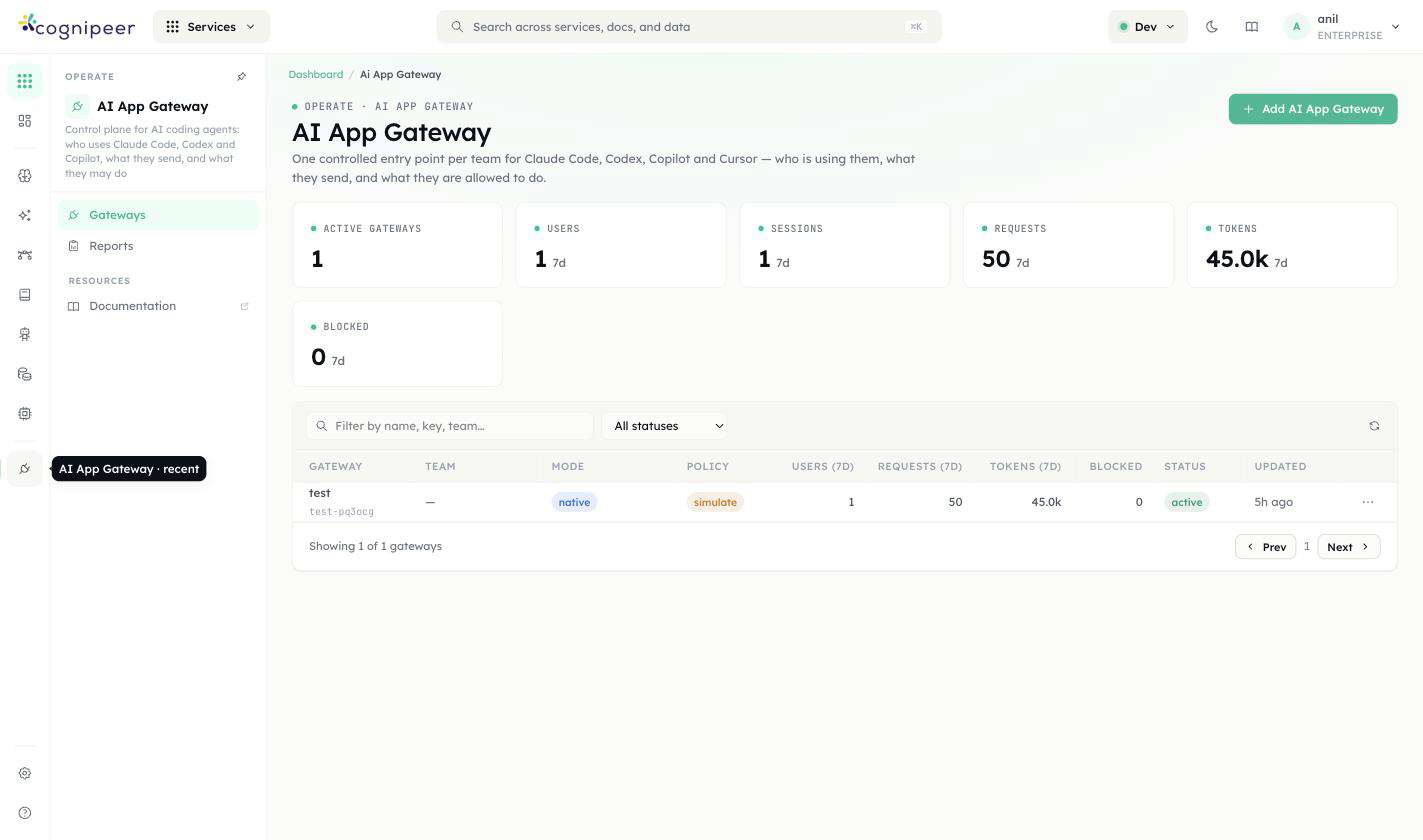
Each row shows:
| Column | Meaning |
|---|---|
| Gateway | Display name and its URL key |
| Team | Optional grouping label — reporting only, no effect on routing or policy |
| Mode | native (traffic proxied as-is) |
| Policy | The gateway's policy mode: simulate, enforce, or disabled |
| Users / Requests / Tokens / Blocked (7D) | Rolling week |
| Status | active or paused |
Click into a gateway for its detail page — Overview, Setup, Requests, Policy, Members, Settings, and Aliases tabs.
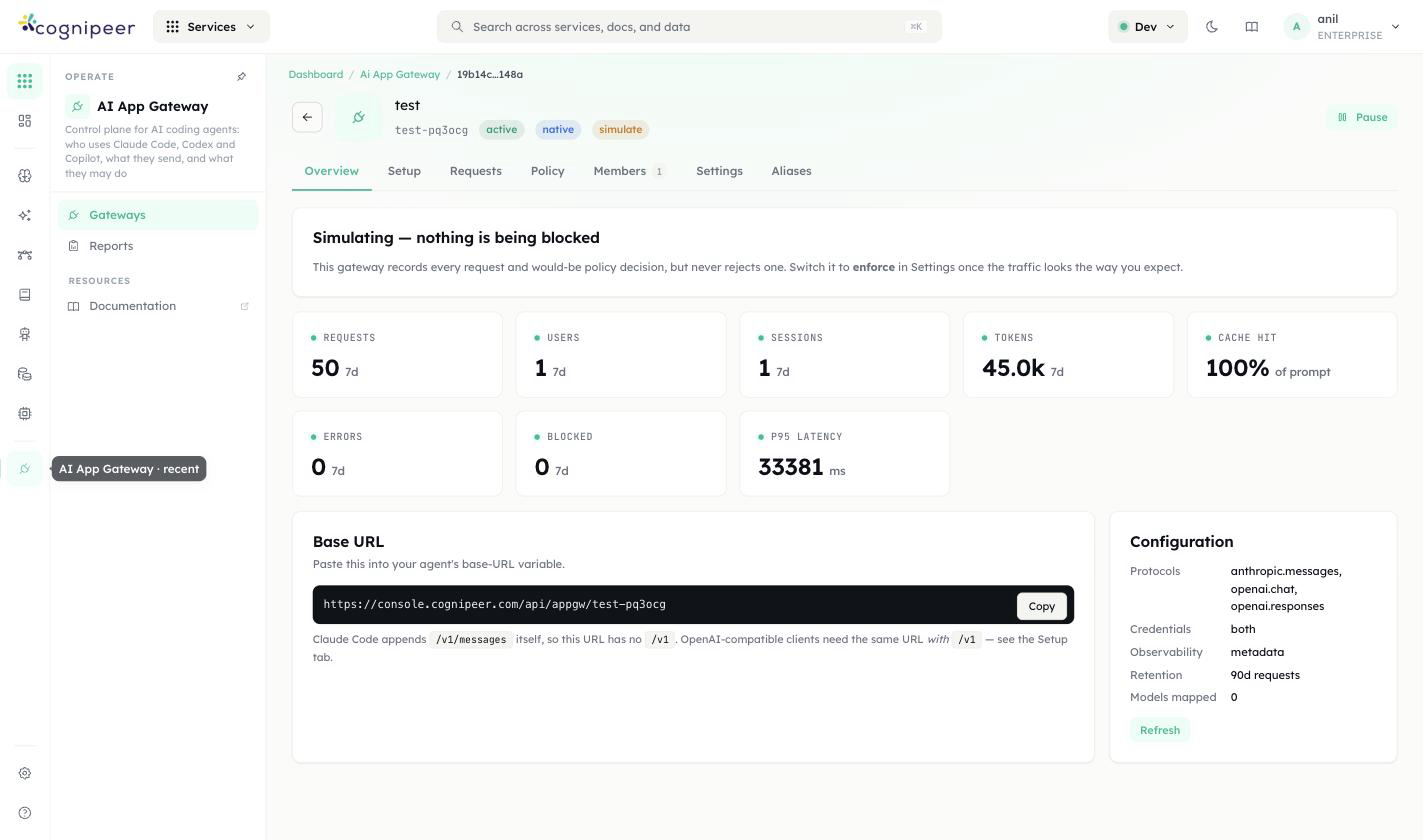
A gateway that's still in simulate mode shows a banner: "Simulating — nothing is being blocked. This gateway records every request and would-be policy decision, but never rejects one. Switch it to enforce in Settings once the traffic looks the way you expect."
The Overview tab also carries the Base URL developers paste into their client (https://<your-console>/api/appgw/<gateway-key>) and a Configuration summary: which wire protocols are accepted (anthropic.messages, openai.chat, openai.responses), whether credentials are required, observability level, and retention window.
Setup
The Setup tab generates the exact shell config for a given developer and client, from three choices — pick the three, get exactly one config block:
Who pays — see Who pays: three modes below. This is the choice most likely to break a client silently, so read it before picking a client.
Who will use it — the person the generated URL is attributed to. The identity travels in the URL itself (a per-user path segment), not in a header the client has to set. See Members and per-user URLs.
Client — searchable picker, grouped into two categories:
- Coding agents — Claude Code, Codex CLI, GitHub Copilot CLI, Goose, Aider, OpenCode, Crush, Amp
- IDEs & extensions — Cursor
One gateway can serve every client and every "who pays" mode at once, across different developers — the difference only shows up in the config block each developer pastes on their own machine. There's also a protocol-introspection endpoint any client (or a raw
curl/SDK integration) can hit directly:curl -sS "https://<your-console>/api/appgw/<gateway-key>/protocol" | jq.
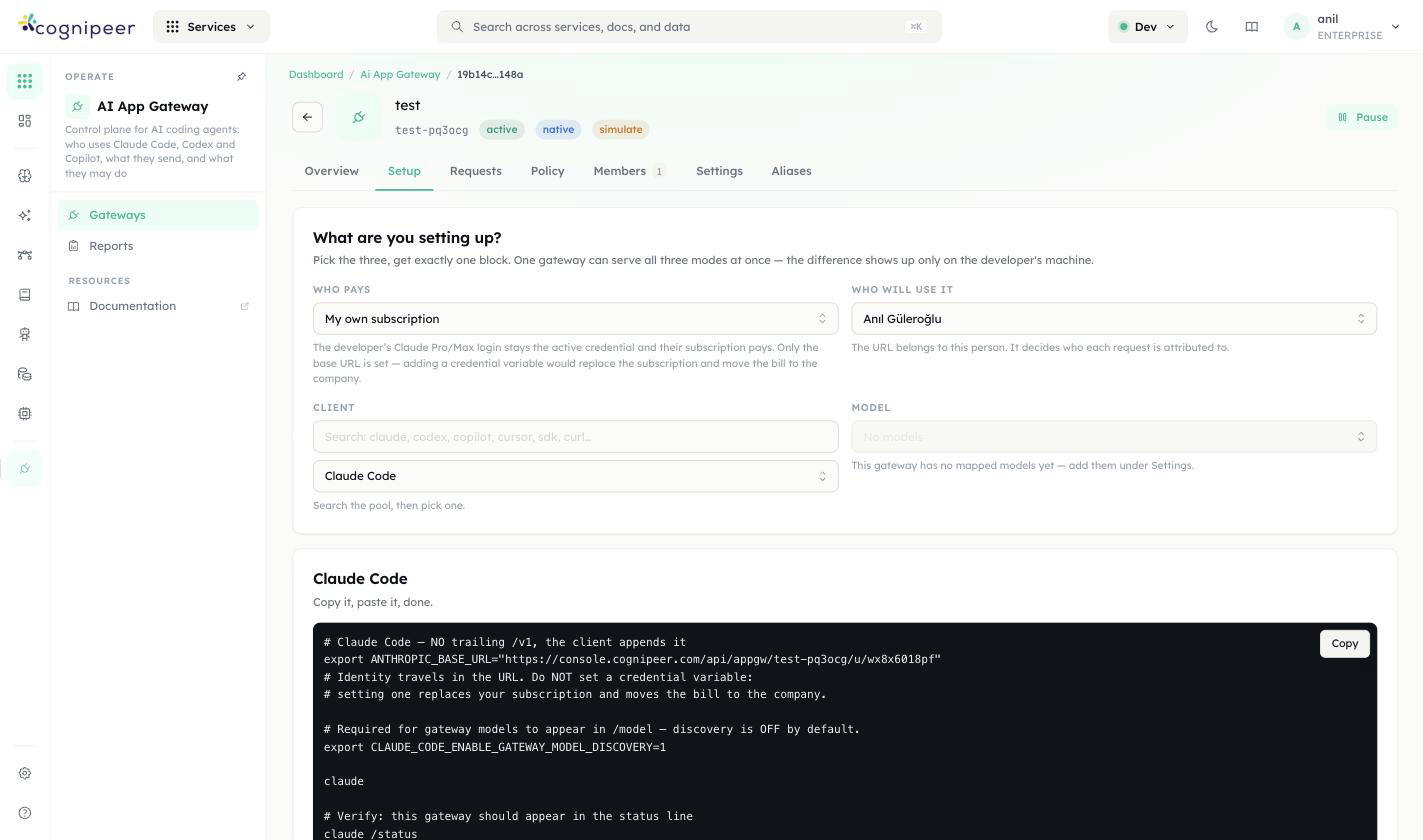
For Claude Code, the generated block looks like:
# Claude Code — NO trailing /v1, the client appends it
export ANTHROPIC_BASE_URL="https://console.example.com/api/appgw/<gateway-key>/u/<user-id>"
# Identity travels in the URL. Do NOT set a credential variable:
# setting one replaces your subscription and moves the bill to the company.

# Required for gateway models to appear in /model — discovery is OFF by default.
export CLAUDE_CODE_ENABLE_GATEWAY_MODEL_DISCOVERY=1

claude

# Verify: this gateway should appear in the status line
claude /statusOpenAI-compatible clients (Codex CLI, GitHub Copilot CLI, Cursor, and the rest of the coding-agent list) get the same base URL with a trailing /v1 — Claude Code is the one exception, since it appends /v1/messages itself. For example, Cursor's generated block is a straight paste into Cursor Settings → Models → OpenAI API Key → "Override OpenAI Base URL":
# Cursor
# Paste these in: Cursor Settings → Models → OpenAI API Key → "Override OpenAI Base URL"

Base URL:  https://console.cognipeer.com/api/appgw/<gateway-key>/u/<user-id>/v1
API key:   <GATEWAY_TOKEN>
Model:     claude-opus-5

# The key is a real credential — the organisation pays for this traffic.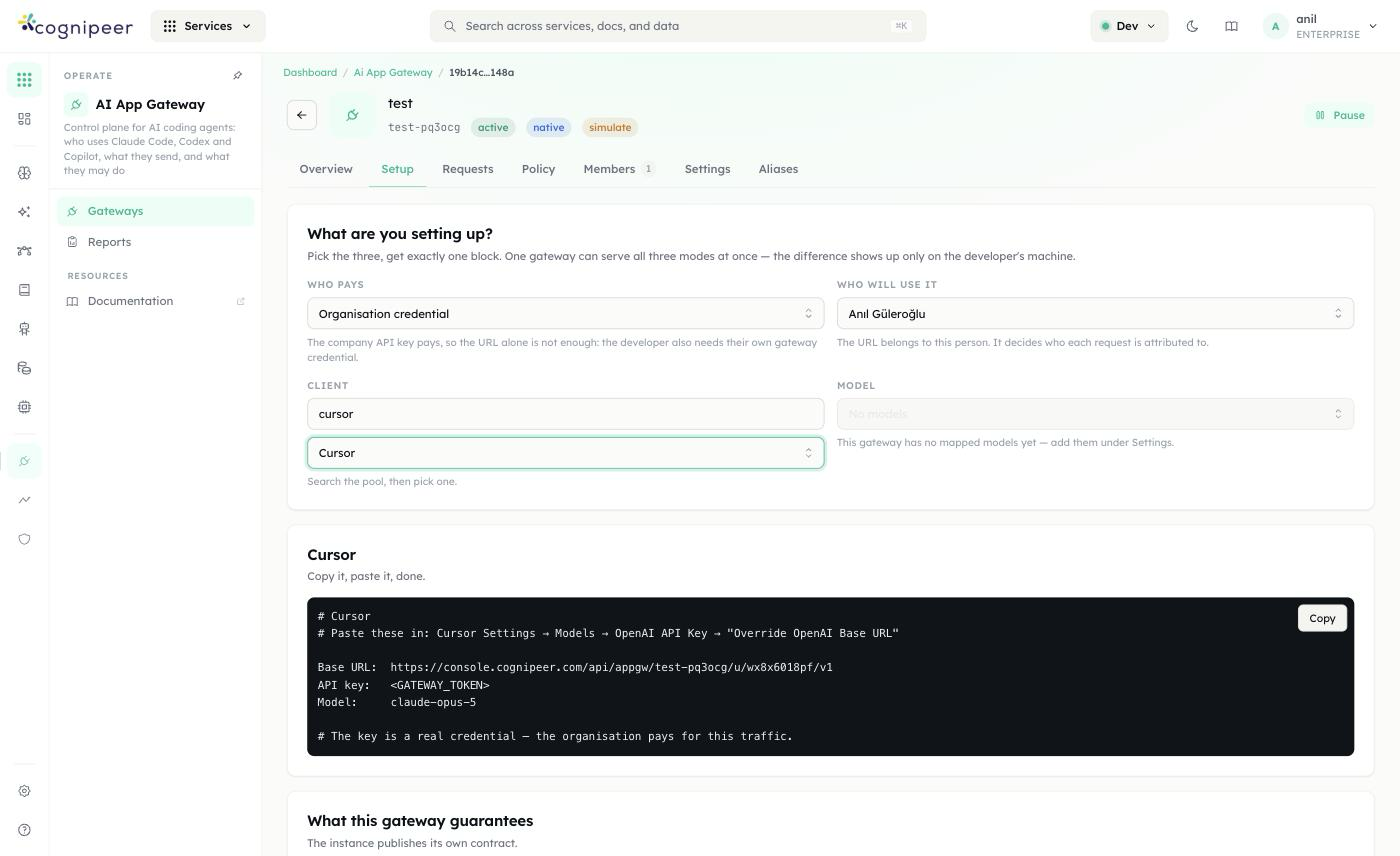
Who pays: three modes
| Mode | What it means | Extra requirement |
|---|---|---|
| My own subscription | The developer's own Claude Pro/Max (or ChatGPT) login stays the active credential — the gateway only sets the base URL. Adding a credential variable on top would replace the subscription and move the bill to the company instead. | None — base URL only. |
| Organisation credential | The company's upstream API key pays. Because the URL alone doesn't carry a secret, the developer also needs their own gateway credential (a token minted for that member, kept out of the URL). | A gateway token (<GATEWAY_TOKEN> / CGATE_TOKEN) the developer keeps in their own env, never in the URL. |
| Local model | Routes to a model the gateway has mapped from a local/self-hosted provider instead of a hosted vendor. | A model must be mapped on this gateway under Settings first — an unmapped gateway shows "No models" here. |
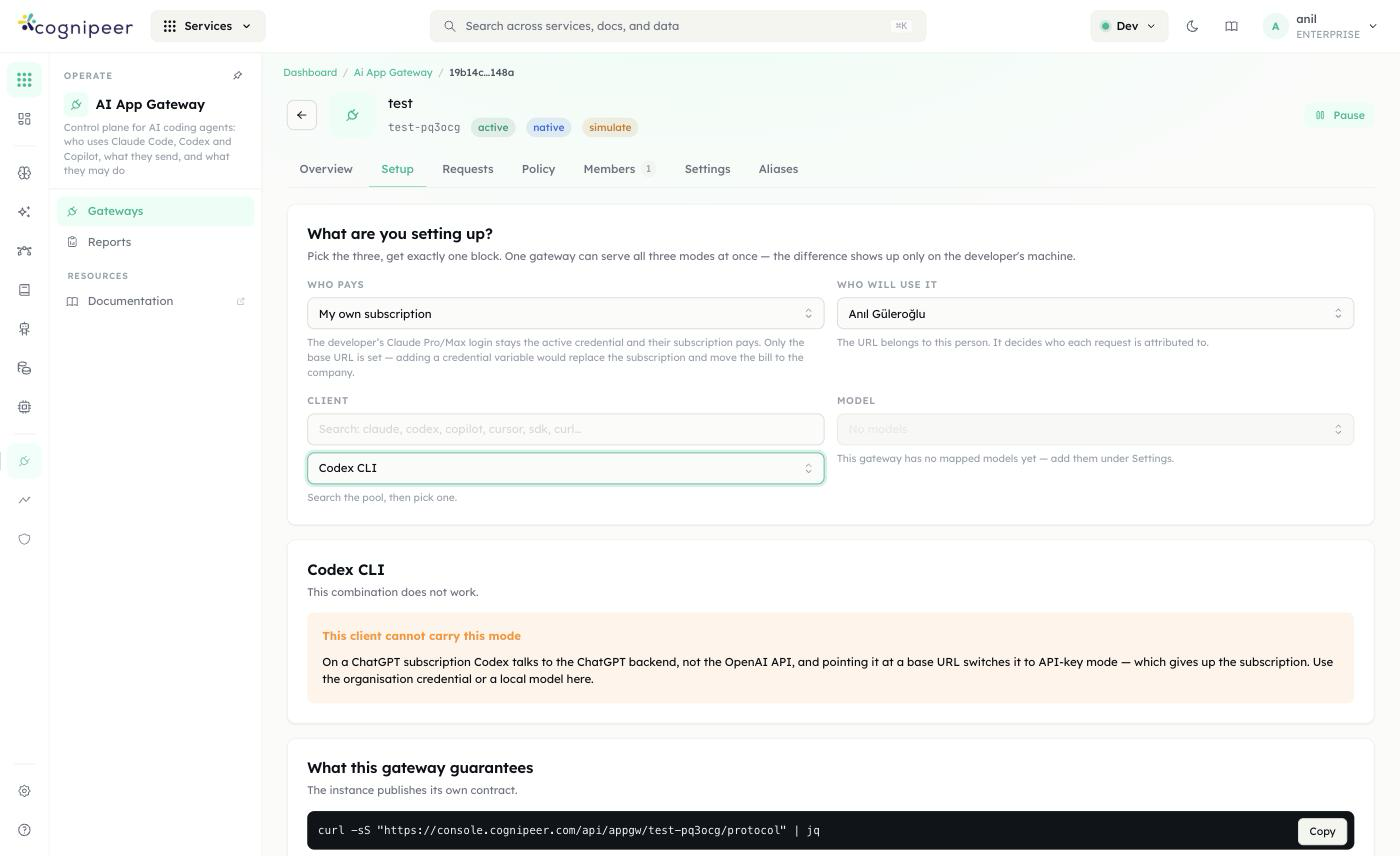
Not every client supports every mode. Codex CLI is the sharp example: on a ChatGPT subscription, Codex talks to the ChatGPT backend, not the OpenAI API — pointing it at a base URL switches it to API-key mode, which gives up the subscription. Picking Codex CLI while "Who pays" is still My own subscription surfaces an explicit error instead of a broken config:
This combination does not work. "This client cannot carry this mode" — On a ChatGPT subscription Codex talks to the ChatGPT backend, not the OpenAI API, and pointing it at a base URL switches it to API-key mode — which gives up the subscription. Use the organisation credential or a local model here.
Switching Who pays to Organisation credential immediately produces a working config instead:
# ~/.codex/config.toml
model_provider = "cgate"

[model_providers.cgate]
name     = "Cognipeer C-Gate"
base_url = "https://console.example.com/api/appgw/<gateway-key>/u/<user-id>/v1"
env_key  = "CGATE_TOKEN"
# This gateway serves chat completions, not the Responses API.
wire_api = "chat"
requires_openai_auth = false

# export CGATE_TOKEN="<GATEWAY_TOKEN>"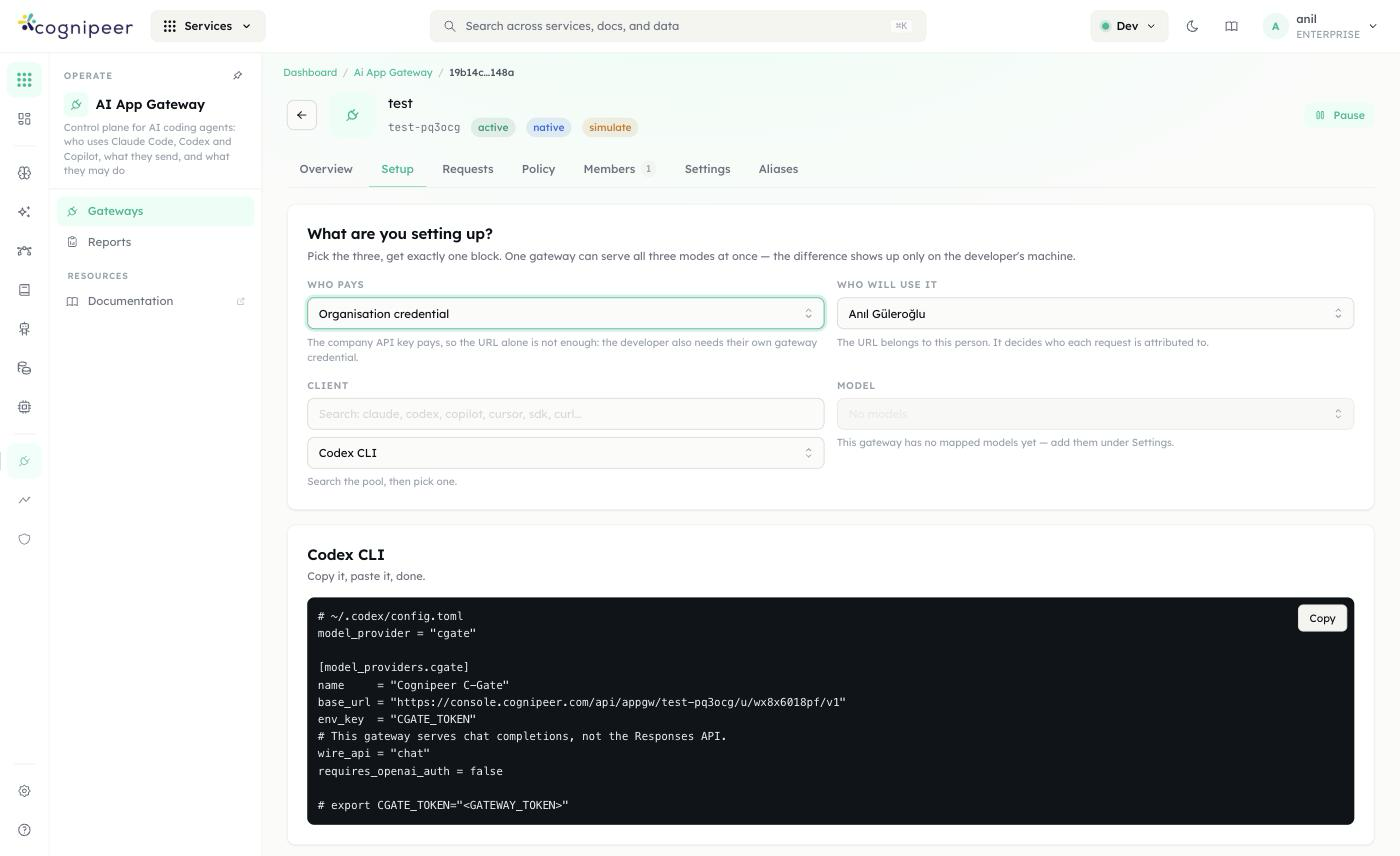
The takeaway: before troubleshooting a client integration, check Who pays first — a client that looks broken is very often just pointed at a mode it can't carry.
Members and per-user URLs
The Members tab is where multi-user access is actually granted — every row here is one developer with their own attributed URL, independent of who administers the gateway.
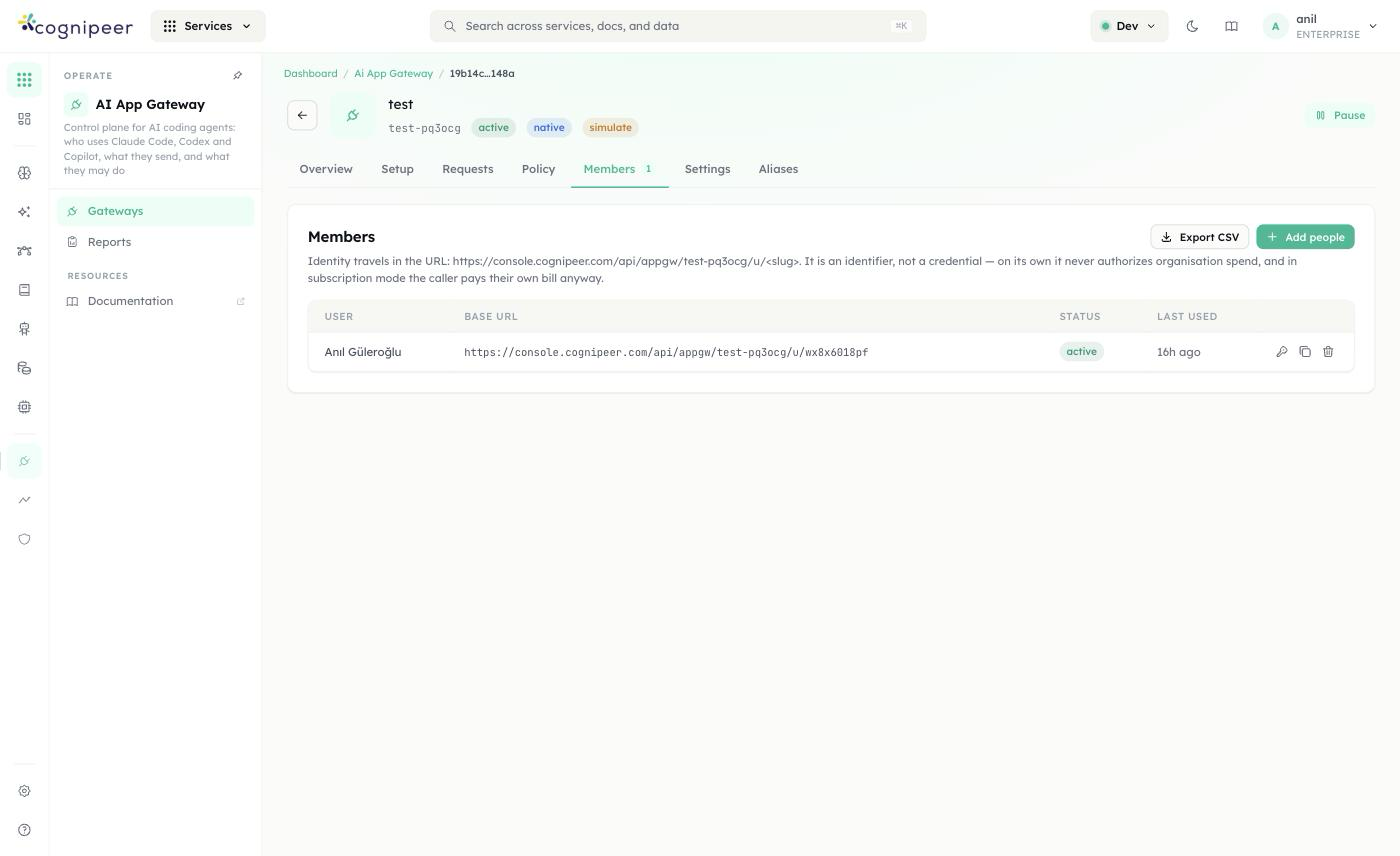
- Add people invites additional developers to this gateway; Export CSV dumps the member list (user, base URL, status, last used) for provisioning or audit.
- Each member's row shows their Base URL — the same
.../u/<slug>pattern from Setup, generated per person rather than typed by hand — plus Status (active/revoked) and Last Used. - The explanatory copy on this tab makes the security model explicit: "Identity travels in the URL:
https://<your-console>/api/appgw/<gateway-key>/u/<slug>. It is an identifier, not a credential — on its own it never authorizes organisation spend, and in subscription mode the caller pays their own bill anyway." In other words: a leaked per-user URL under My own subscription or Local model mode attributes traffic to that person but doesn't hand out spend; only Organisation credential mode pairs the URL with an actual secret (the gateway token), and that token is never embedded in the URL itself. - Row actions (icons on the right) let an admin regenerate a member's URL/credential, copy it, or revoke access — revoking flips Status without deleting the member's request history.
This is also how the gateway supports many developers on one gateway without them sharing a credential: each person gets their own row, their own URL, their own token when one applies, and their own line in Requests — so policy decisions, blocks, and spend are all attributable per person even though they're all going through the same <gateway-key>.
Policy
Detects and refuses — never rewrites
The gateway's enforcement model is deliberately narrow: it can block a request, never silently rewrite one. Anthropic's gateway contract is explicit that redacting request bodies breaks the capability pairing Claude Code relies on, and redacting file contents an agent just read would make it write [REDACTED] back into your repository. Response-side checks are audit-only for the same reason a stream can't be blocked mid-delivery — by the time bytes can be classified, they've already reached the user.
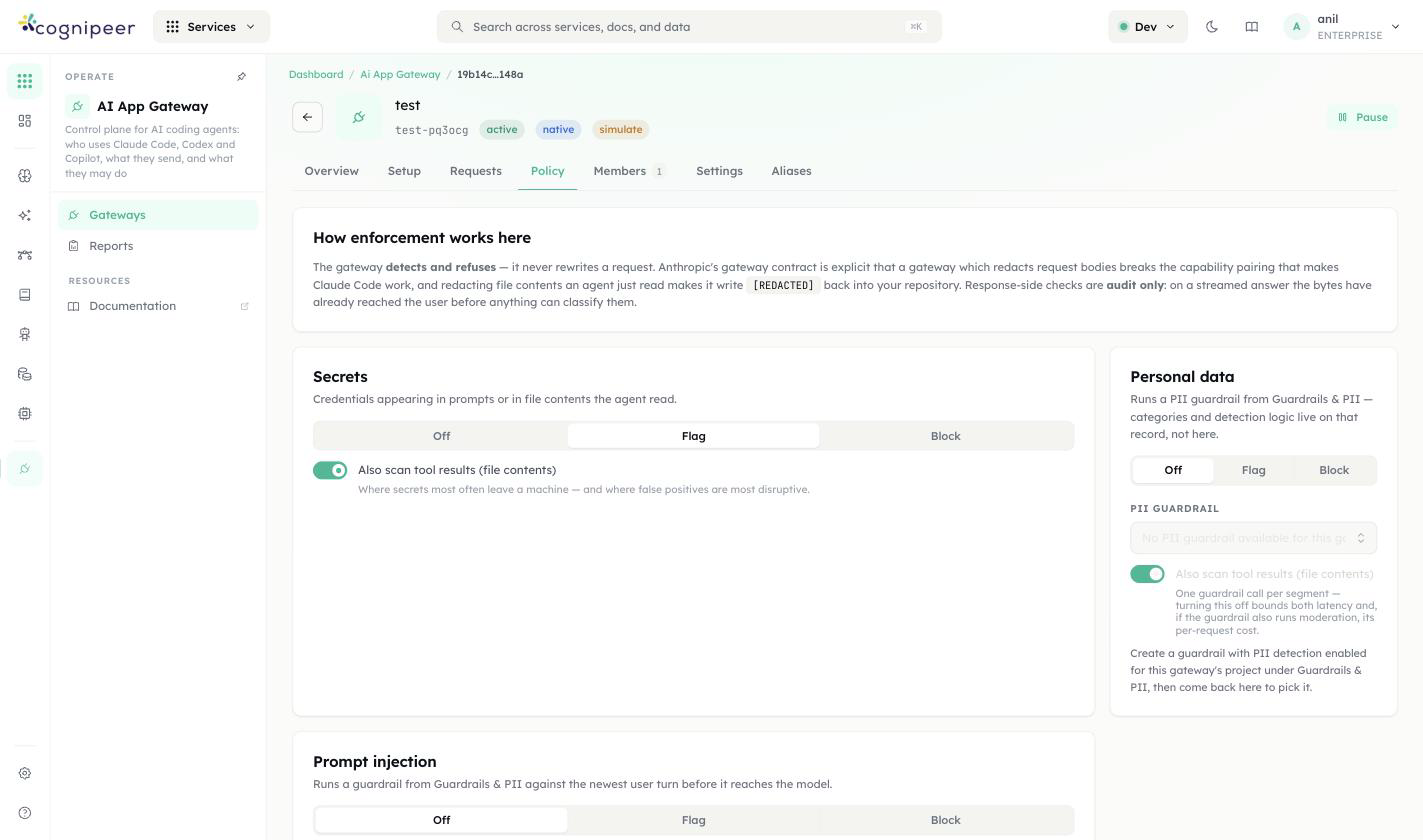
Three independent checks, each Off / Flag / Block:
- Secrets — credentials appearing in prompts or in file contents the agent read. A separate toggle extends the scan to tool results (file contents), since that's both where secrets most often leave a machine and where false positives are most disruptive.
- Personal data — delegates to a PII guardrail from Guardrails & PII rather than reimplementing detection here; you pick which guardrail to run from a dropdown once one exists for this gateway's project. The same "also scan tool results" toggle applies — each call costs one guardrail evaluation per segment, so turning it off bounds both latency and, if that guardrail also runs moderation, its per-request cost.
- Prompt injection — runs a guardrail against the newest user turn before it reaches the model.
Requests
Every request is logged with its policy decision and which rule(s) fired, filterable by agent, status, decision, and date range, with an optional live tail and session grouping.
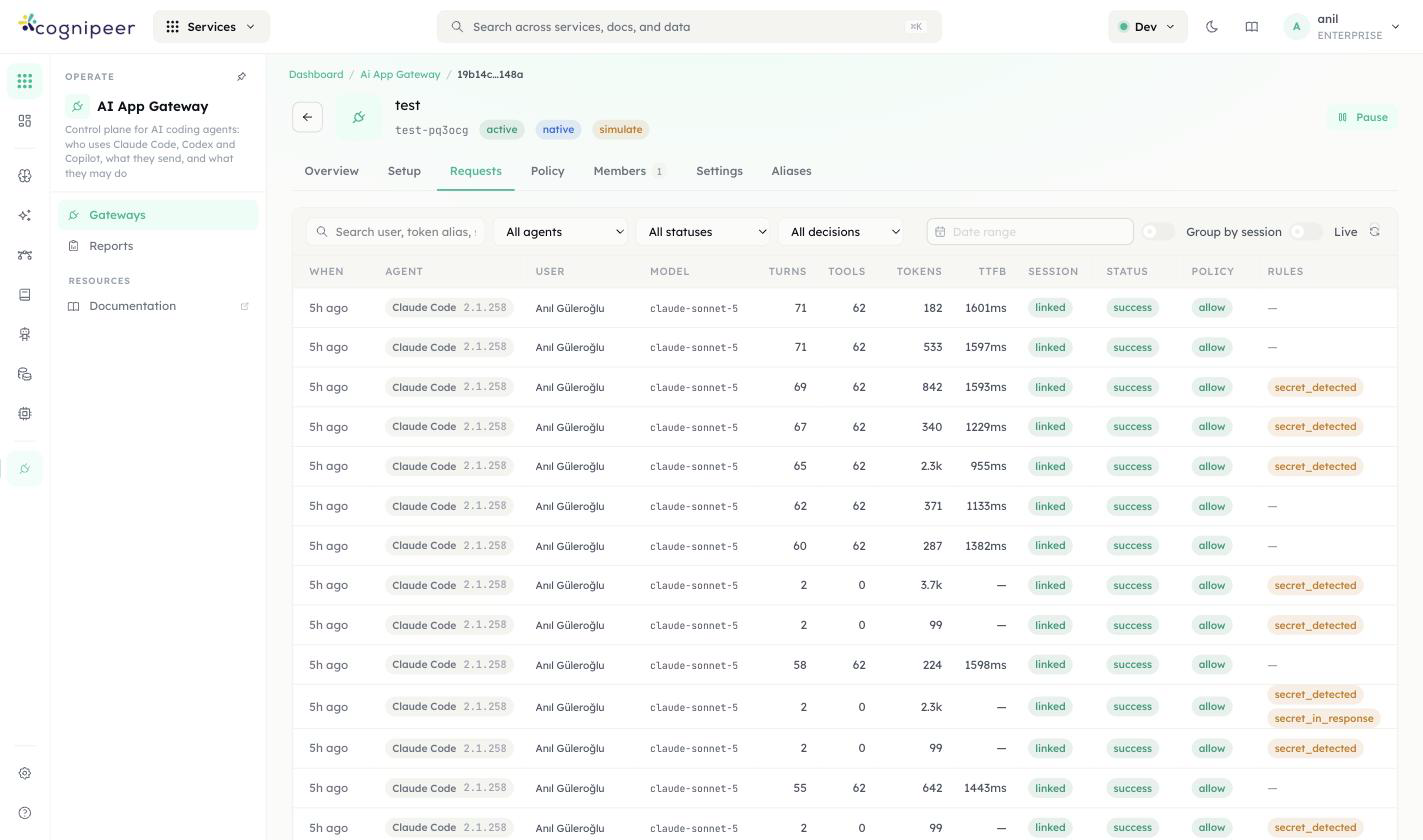
Columns: when, agent (with client version, e.g. Claude Code 2.1.258), user, model, turn/tool counts, tokens, time-to-first-byte, session (linked), status, policy decision (allow / block), and the specific rule matched (e.g. secret_detected, secret_in_response) when one did. This is the same turn-grouped request/response viewer the community edition ships for Model Hub and Tracing.
Settings
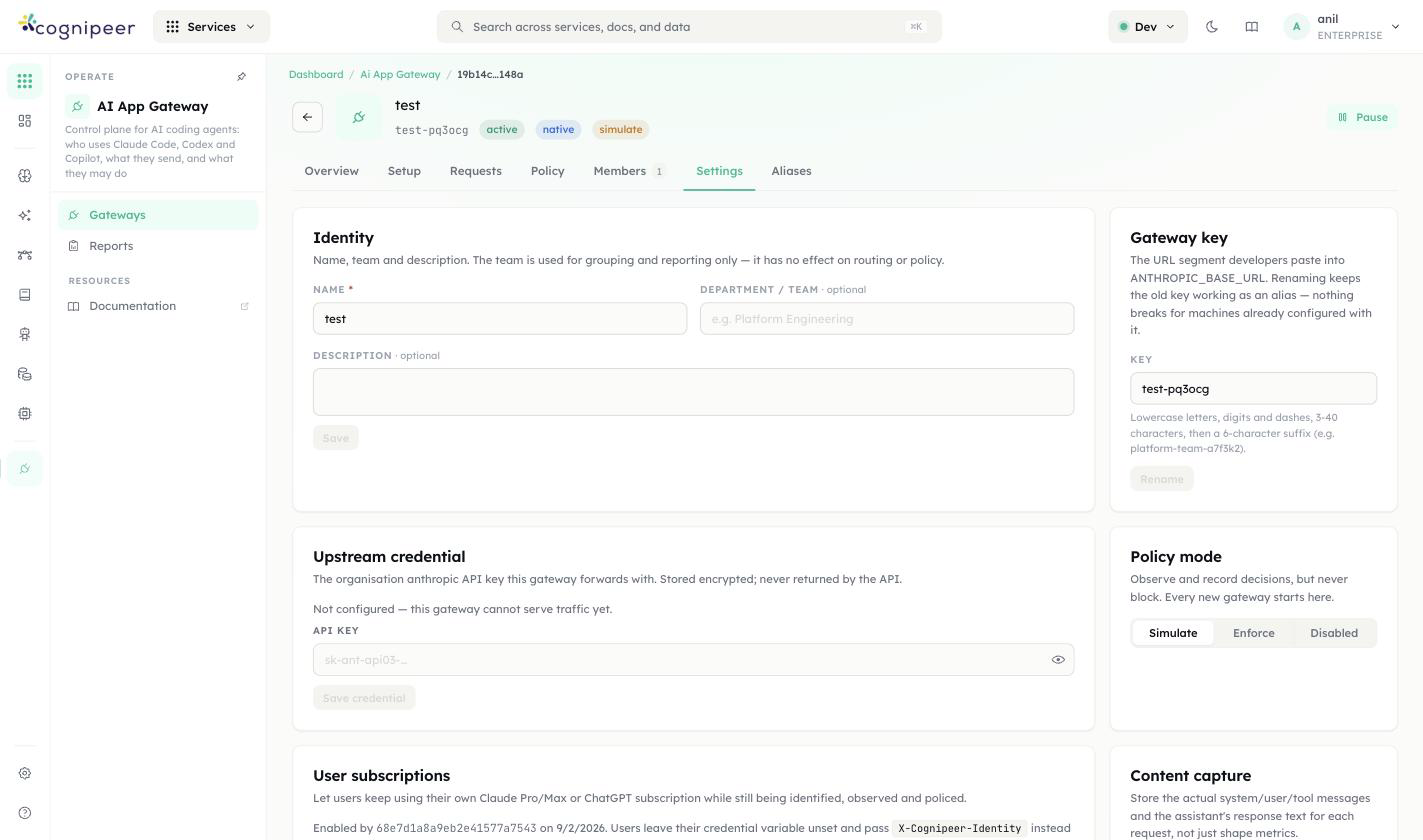
- Identity — name, optional team, optional description. The team is reporting-only.
- Gateway key — the URL segment developers paste into
ANTHROPIC_BASE_URL. Renaming keeps the old key working as an alias (tracked under the Aliases tab), so nothing breaks for machines already configured with it. - Upstream credential — the organization's Anthropic API key this gateway forwards with, stored encrypted and never returned by the API. A gateway with no credential configured cannot serve traffic yet.
- Policy mode — Simulate (observe and record decisions, but never block — every new gateway starts here), Enforce, or Disabled.
- User subscriptions — lets developers keep using their own Claude Pro/Max or ChatGPT subscription while still being identified, observed, and policed: they leave their credential variable unset and the gateway reads identity from the URL instead.
- Content capture — whether to store the actual system/user/tool messages and the assistant's response text per request, versus shape-only metrics.
See Members and per-user URLs above for how the Members tab grants and attributes per-developer access.
Related
- Guardrails — the community guardrail hook plane, including the
tool_accessfamily that replaces Aegis's tool-enforcement role - Enterprise release notes: AI App Gateway
- Agent Tracing — the turn-grouped request/response viewer this module's Requests tab builds on