

Knowledge Engine
The Knowledge Engine (Retrieval-Augmented Generation / RAG) service provides end-to-end document ingestion, chunking, embedding, and semantic retrieval. It surfaces in the console as Data → Knowledge Engine.
Knowledge Engine
A Knowledge Engine module is the configuration unit that ties a chunking strategy, an embedding model, and a vector index together. The Knowledge Engine screen lists every module configured for the active project, with counters for modules, documents indexed, and chunk count.
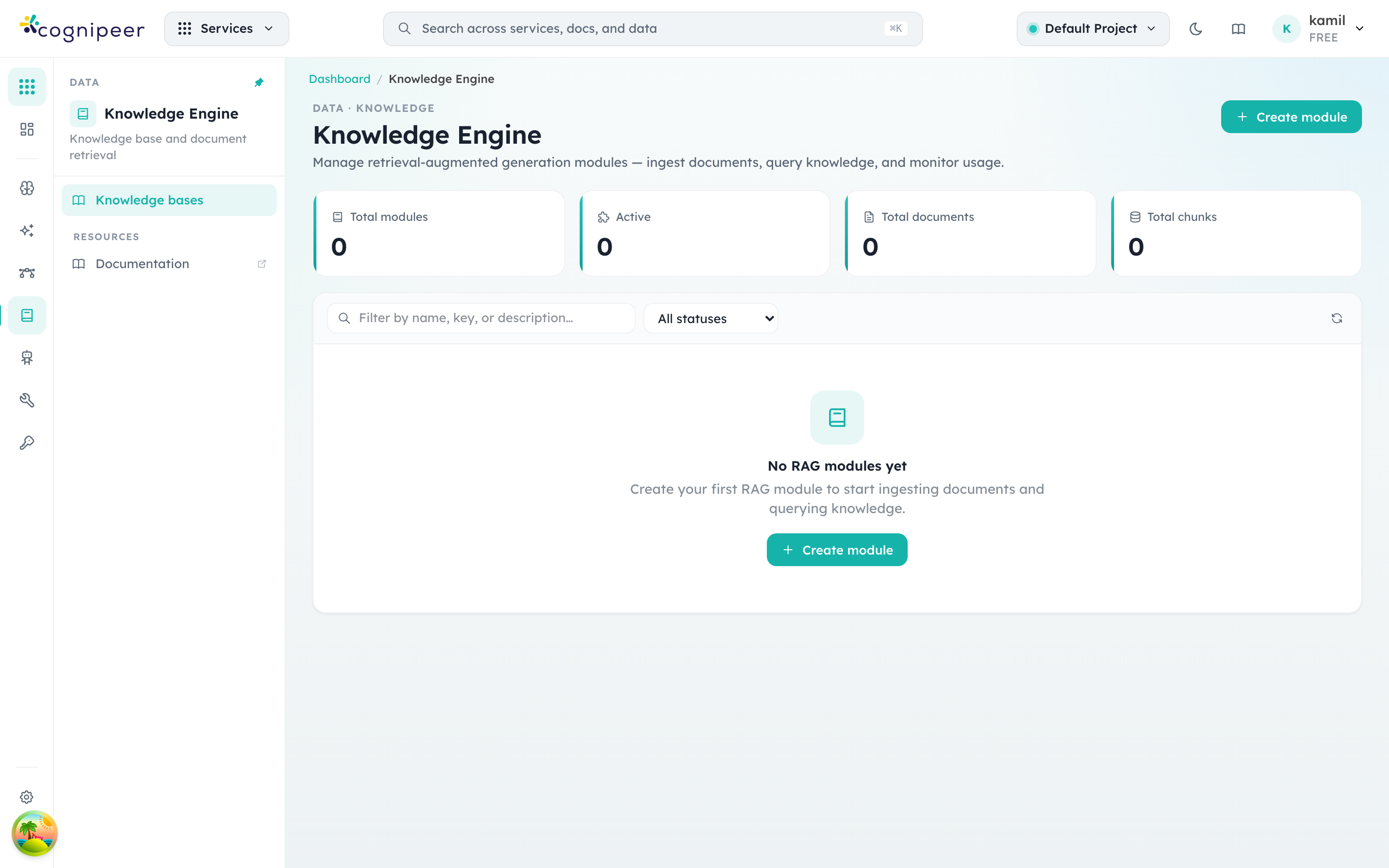
When the project is empty the screen shows the onboarding CTA — clicking Create module opens a multi-step form where you choose the source datasource, pick chunking parameters (size, overlap, splitter), select an embedding model from Model Hub, point the output at a vector index (see Vector Stores), and — optionally — attach a Reranker to re-order results before they reach the LLM.
When a reranker is attached, retrieval becomes a two-stage pipeline: the vector store returns top-K candidates and the reranker scores them down to the final top-N. This is the recommended way to plug Cohere Rerank, Jina, Voyage, or any cross-encoder onto an existing Knowledge Engine module without changing the embedding model or vector store.
Architecture
Document → Chunk → Embed → Vector Store
                              ↓
Query → Embed → Vector Search → (Reranker?) → Return MatchesConcepts
| Concept | Description |
|---|---|
| Knowledge Engine Module | Configuration container linking chunking strategy, embedding model, and vector index |
| Document | A text or file ingested into a module |
| Chunk | A segment of a document after splitting |
| Query Log | Audit record of retrieval queries |
Service Functions
| Function | Description |
|---|---|
createRagModule() | Create module with chunk/embed config |
updateRagModule() | Update module settings |
deleteRagModule() | Delete module and associated data |
getRagModule() | Get by key |
listRagModules() | List modules for tenant |
ingestDocument() | Text ingestion: chunk → embed → store |
ingestFile() | File ingestion: convert → chunk → embed → store |
queryRag() | Semantic retrieval |
deleteRagDocument() | Delete document and its vectors |
reingestDocument() | Re-chunk and re-embed existing document |
listRagDocuments() | List documents in a module |
listRagQueryLogs() | Query audit log |
Module Configuration
{
  "name": "Support Knowledge Base",
  "key": "support-kb",
  "embeddingModelKey": "text-embedding-ada-002",
  "vectorProviderKey": "vectors-prod",
  "vectorIndexKey": "support-index",
  "rerankerKey": "support-rerank",
  "chunkConfig": {
    "strategy": "recursive",
    "chunkSize": 1000,
    "chunkOverlap": 200
  }
}rerankerKey is optional. When present, the matching reranker (see Reranker) runs after vector search and before the response is returned.
Text Ingestion
POST /api/client/v1/rag/modules/:key/ingest
Authorization: Bearer <token>{
"fileName": "product-faq.txt",
"content": "Long document text here...",
"contentType": "text/plain",
"metadata": { "source": "docs", "version": "2.0" }
}Pipeline:
- Split text into chunks using configured strategy
- Generate embeddings for each chunk
- Upsert vectors to the vector index
- Store document and chunk metadata
File Ingestion
Submit a file for automatic processing:
- File is converted to Markdown (using
@cognipeer/to-markdown) - Markdown is chunked according to module config
- Chunks are embedded and stored
Querying
POST /api/client/v1/rag/modules/:key/query
Authorization: Bearer <token>{
"query": "How do I reset my password?",
"topK": 5,
"filter": { "source": "docs" }
}Pipeline:
- Embed the query text
- Perform vector similarity search
- Return matching chunks with scores and metadata
Response:
{
  "matches": [
    {
      "content": "To reset your password, navigate to...",
      "score": 0.92,
      "metadata": { "source": "docs", "documentTitle": "Product FAQ" }
    }
  ]
}Re-ingestion
When a document is updated or chunking config changes, use reingestDocument() to:
- Remove existing vectors for the document
- Re-chunk with current settings
- Re-embed and store new vectors
Dependencies
The Knowledge Engine pipeline integrates several control plane services:
- Inference Service — For generating embeddings
- Vector Service — For storing and querying vectors
- File Service — For file conversion (optional)
Metadata Filtering
Queries accept a filter in the console's canonical filter language, which the control plane pushes down to the vector store — see Vector Stores → Metadata Filtering for the operator list and per-provider support.
A module can also carry its own filter configuration:
| Setting | Effect |
|---|---|
defaultFilter | ANDed into every query against the module. Lets several sources share one vector index while each module retrieves only its own slice. |
filterableFields | Metadata keys callers may filter on. A query touching any other key is rejected with 400. The list is also surfaced to agents and MCP clients as the filter argument's documentation, so a model knows what it may narrow by. |
curl -X POST "$CONSOLE_URL/api/client/v1/rag/modules/support-kb/query" \
  -H "Authorization: Bearer $TOKEN" \
  -H "Content-Type: application/json" \
  -d '{
    "query": "how do I reset my password?",
    "topK": 5,
    "filter": { "source": "crawler", "depth": { "$lte": 2 } }
}'A filter the underlying vector store cannot push down is rejected rather than ignored, so a filtered query never silently returns unfiltered passages.