

PII Service
The PII service detects, redacts, masks, reversibly tokenizes, and (optionally) blocks personally identifiable information across 11 languages. Unlike the rest of the platform, it is license-free — every endpoint under /api/pii/* is available on every plan and is never gated by a license feature flag.
Operators manage policies under Operate → PII. Agents and external clients consume it either through stored policies or through ad-hoc detect/redact/mask/tokenize calls.
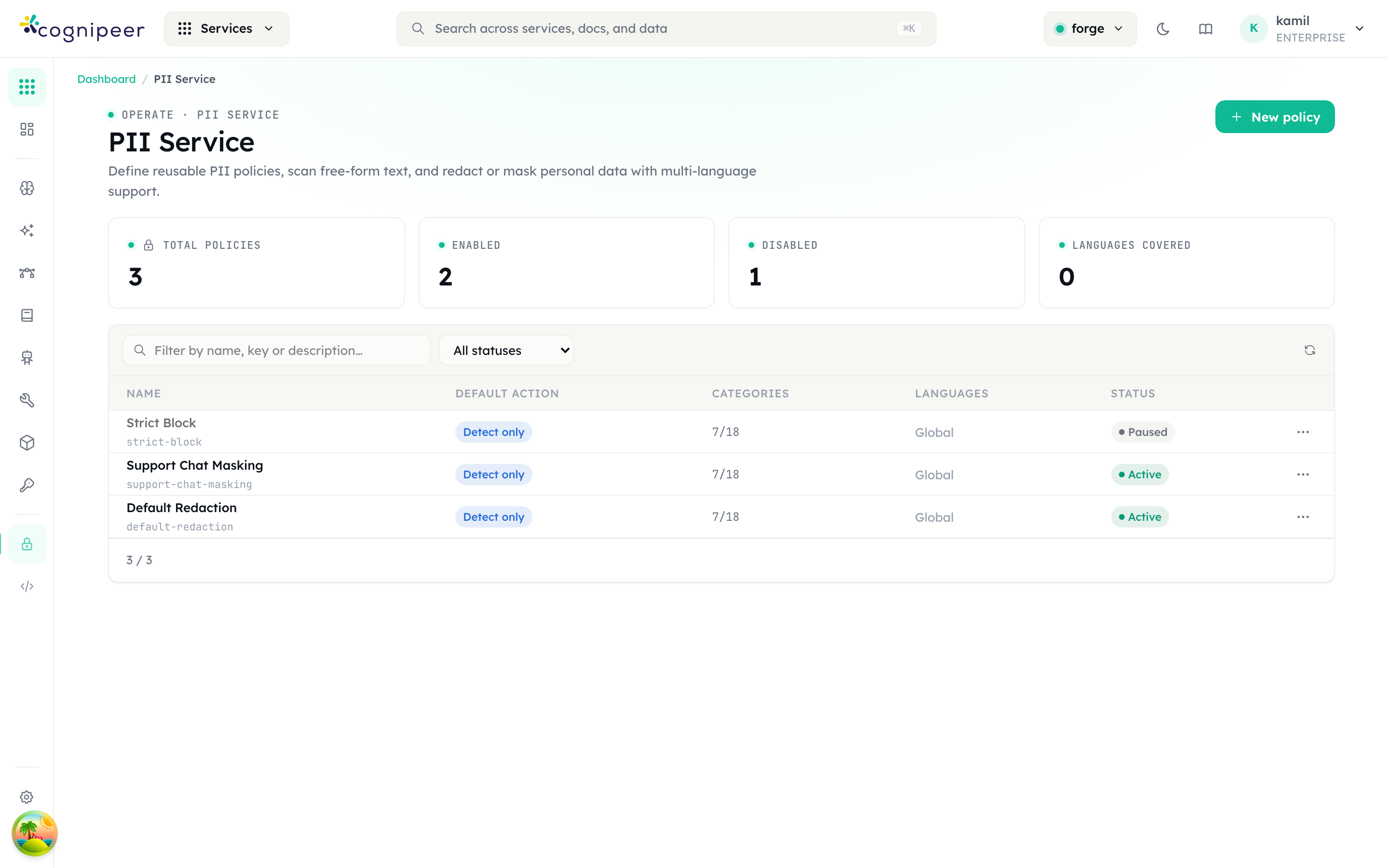
The policy list shows total / enabled / disabled counts and the languages covered, with each row carrying its default action, the number of enabled categories, the scanned languages, and an enabled/paused status toggle. New policy opens the editor.
Concepts
- Category — a built-in PII class (
email,phone,creditCard,iban,nationalId,passport,address,ipAddress,url,socialHandle,apiKey,cryptoWallet,birthDate,swift). Each category ships with multi-language detectors. - Policy — a named, project-scoped configuration that picks which categories are enabled, which languages to scan, a default action (
detect | redact | mask | block | tokenize), and any custom regex patterns. - Action
detect— return findings only (no transformation)redact— replace matches with[REDACTED_<CATEGORY>]mask— partially obfuscate the match (preserve first/last characters where applicable)tokenize— reversible masking: replace each match with a unique token ([EMAIL_1]) and return a vault so the original can be restored later viadetokenizeblock— surface a structured rejection that callers (e.g. inference) can short-circuit on
Supported Languages
global, en, tr, de, fr, es, it, pt, ar, ja, zh. A policy can pick a subset; if none is set, the detector falls back to global + the request locale.
Policies
Policies are stored in the tenant database (pii_policies) and scoped to a project. Create them in the dashboard or via API:
curl -X POST https://console.example.com/api/pii/policies \
  -H "Content-Type: application/json" \
  -d '{
    "name": "Customer support intake",
    "defaultAction": "redact",
    "categories": { "email": true, "phone": true, "creditCard": true },
    "languages": ["en", "tr"],
    "customPatterns": [
      { "name": "internal-ticket", "pattern": "TCKT-\\d{6}", "category": "custom", "action": "mask" }
    ]
}'Once stored, the policy is applied by its policy_key. Everything on the token-authenticated client API is policy-based — detect, redact, mask, tokenize, and scan under /api/client/v1/pii/* all require a policy_key, and the enabled categories, custom regex patterns, and languages all come from the policy (detokenize is the exception — it only needs the vault). This keeps detection rules — including custom patterns, and any term lists added later — controllable and auditable per policy rather than hard-coded per request. See the PII API reference.
Dashboard preview endpoints
The dashboard test panel (under Operate → PII) calls session-authenticated /api/pii/* endpoints to preview detection against the unsaved editor state while you build a policy. These accept categories/customPatterns inline (because there is no saved policy yet) and are not part of the token-authenticated client surface:
# Detect only
curl -X POST https://console.example.com/api/pii/detect \
  -d '{ "text": "Email me at alice@example.com", "locale": "en" }'

# Redact in place
curl -X POST https://console.example.com/api/pii/redact \
  -d '{ "text": "Card 4111 1111 1111 1111", "categories": { "creditCard": true } }'

# Partial mask
curl -X POST https://console.example.com/api/pii/mask \
  -d '{ "text": "+90 532 555 22 33" }'

# Reversible tokenize (returns outputText + vault)
curl -X POST https://console.example.com/api/pii/tokenize \
-d '{ "text": "Call +90 532 555 22 33 or mail a@x.com" }'The dashboard playground (under Operate → PII) uses these endpoints to give an instant preview while editing a policy.
LLM round-trip with tokenize / detokenize
tokenize + detokenize let you strip PII before a model call and restore it afterwards, even when the model only echoes the tokens. Token-authenticated integrations use the client surface (/api/client/v1/pii/*); see the PII API reference.
The vault covers every category — emails, phone numbers, IBANs, credit cards, IP addresses, national IDs, URLs, and any custom pattern:
# 1) Tokenize the prompt with a policy (mixed PII across categories)
curl -X POST https://gateway.example.com/api/client/v1/pii/tokenize \
  -H "Authorization: Bearer $TOKEN" \
  -d '{ "policy_key": "support-intake", "text": "Refund order to a@x.com on card 5555 5555 5555 4444; caller +90 532 555 22 33 from 192.168.1.42" }'
# → { "output_text": "Refund order to [EMAIL_1] on card [CREDITCARD_1]; caller [TR_PHONE_1] from [IPADDRESS_1]",
#     "vault": { "[EMAIL_1]": { "value": "a@x.com", "category": "email" },
#                "[CREDITCARD_1]": { "value": "5555 5555 5555 4444", "category": "creditCard" },
#                "[TR_PHONE_1]": { "value": "+90 532 555 22 33", "category": "tr_phone" },
#                "[IPADDRESS_1]": { "value": "192.168.1.42", "category": "ipAddress" } } }

# 2) Send output_text to the model. It replies, echoing the tokens:
#    "Refunded [CREDITCARD_1], emailed [EMAIL_1], and blocked [IPADDRESS_1]."

# 3) Detokenize the model reply with the same vault
curl -X POST https://gateway.example.com/api/client/v1/pii/detokenize \
  -H "Authorization: Bearer $TOKEN" \
  -d '{ "text": "Refunded [CREDITCARD_1], emailed [EMAIL_1], and blocked [IPADDRESS_1].", "vault": { ... } }'
# → { "output_text": "Refunded 5555 5555 5555 4444, emailed a@x.com, and blocked 192.168.1.42." }Repeated values share one token (a phone number appearing twice yields a single [TR_PHONE_1]), and tokens absent from the vault are left untouched on detokenize. The vault is returned to the caller and never persisted server-side — your application holds it for the duration of the round-trip.
Relationship to Guardrails
The Guardrails PII type wraps this service. When a guardrail of type pii is attached to a model:
- On every inference request the runtime calls
scanWithPolicy()against the configured PII policy. - If the policy's effective action is
block, the request is short-circuited with aguardrail_violationerror containing the findings. - If the action is
redactormask, the runtime substitutes the transformed text before forwarding to the provider.
Use a guardrail when you want PII enforcement inside the inference pipeline. Use the PII service directly when you need detect/redact/mask outside an LLM call (ingestion pipelines, audit jobs, ETL).
Service catalog
In the dashboard nav the PII service lives under Operate. It carries a new badge in the launcher and is keyword-searchable by pii, redact, mask, kvkk, gdpr, kişisel veri.
See the PII API reference for the full request/response schema.