

Guardrails
Guardrails provide real-time content safety checks for LLM inputs and outputs. They detect PII, secrets, banned words and profanity, harmful content, prompt-injection attempts, and unwanted tool/webhook activity — and can block, redact, warn on, or flag what they find. Operators manage them under Operate → Guardrail.
Hook plane rewrite (September 2026)
Guardrails moved from a two-slot model (one policy on the request, one on the response) to a hook plane: six hooks spanning the full request lifecycle, each configurable per policy family. If you're looking for the old inputGuardrailKey / outputGuardrailKey model, see Inference Integration below for how the two map.
Operator view
Each guardrail is a named policy attached to one or more models or agents. The list view summarises the states that matter operationally: total policies, how many are enabled, how many are disabled, and how many block requests.
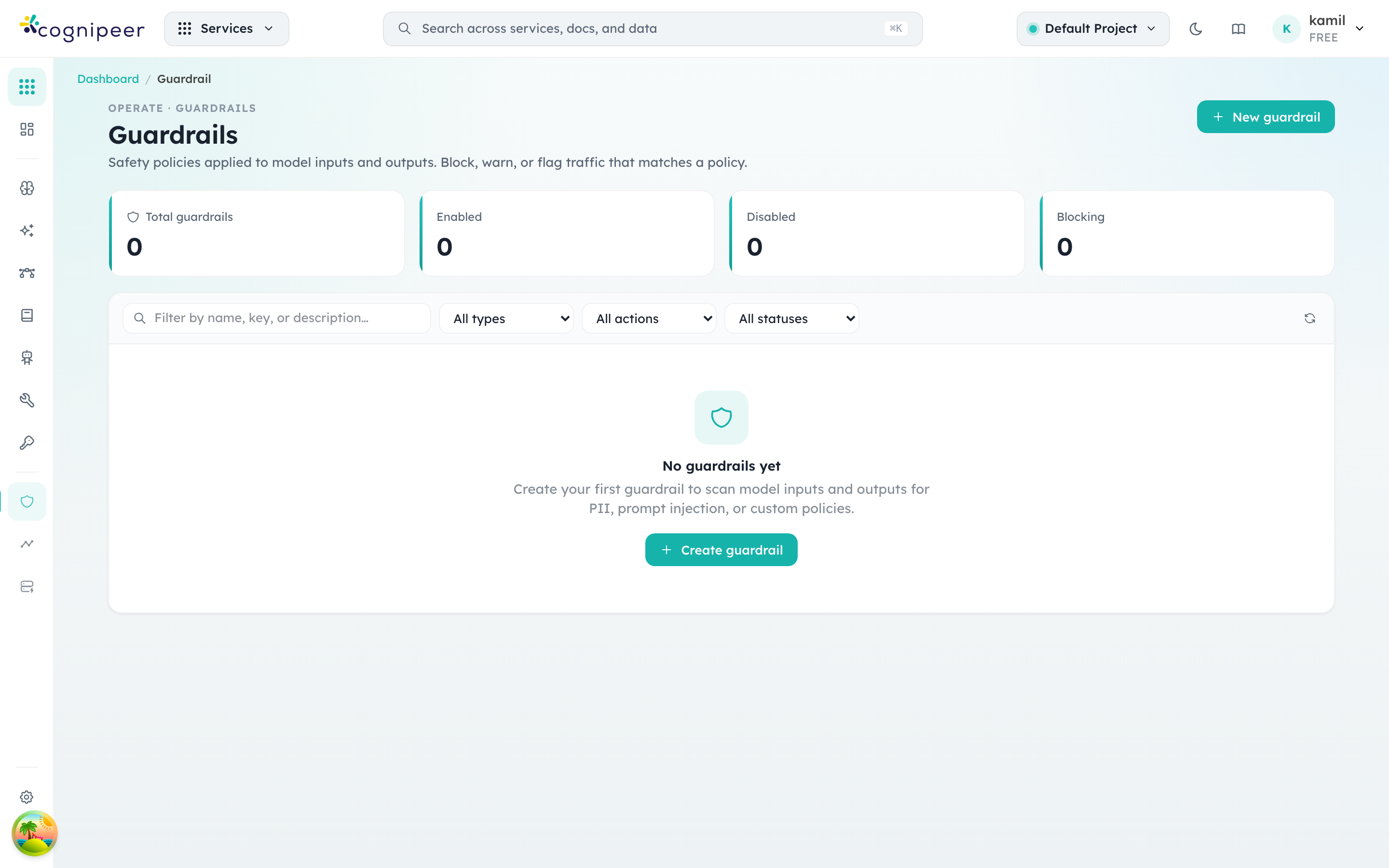
Filters narrow by type (preset / custom), by action, and by status. The Create guardrail flow walks you through picking a type, declaring which checks to enforce, and configuring the default action and failure mode.
Hooks
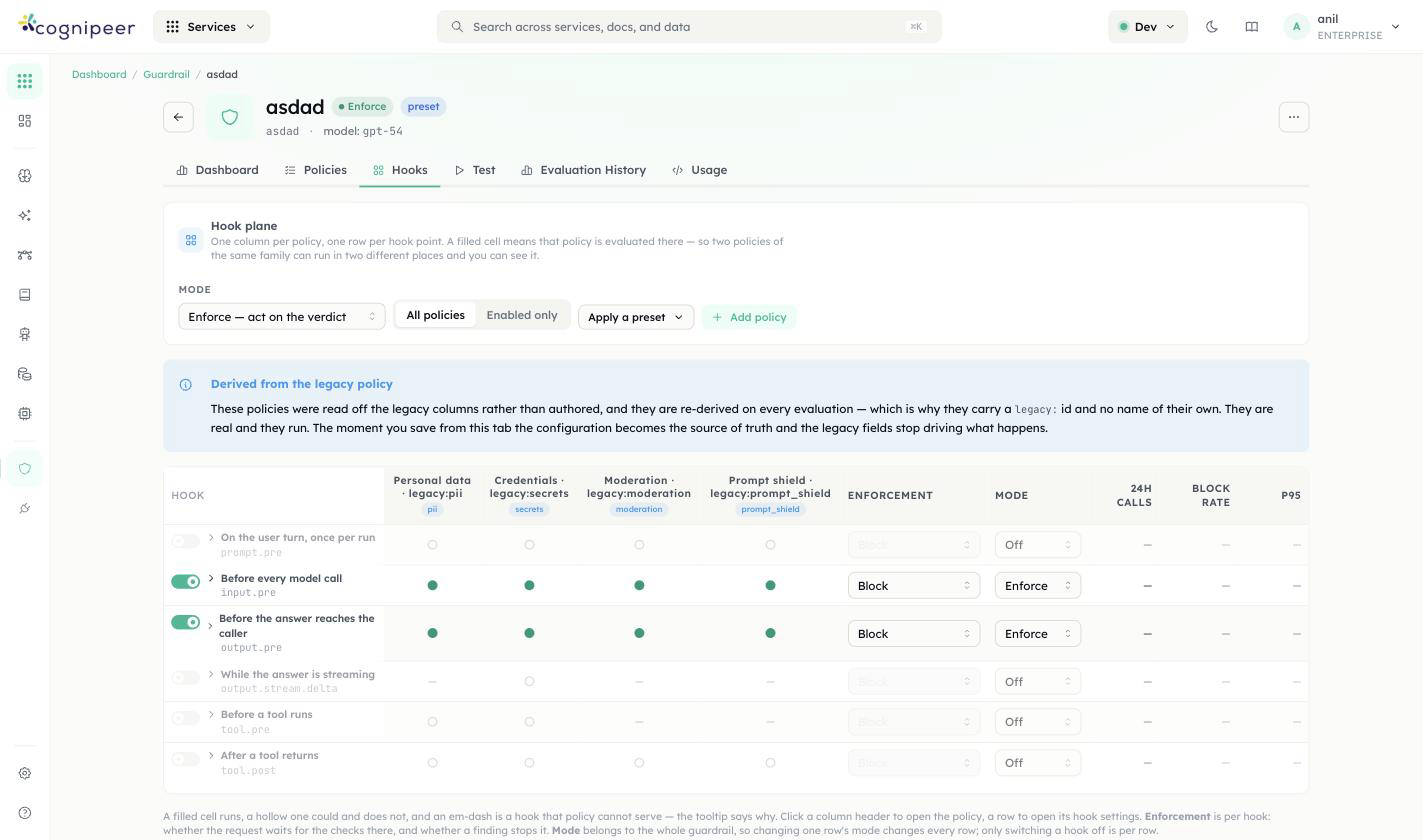
A guardrail is a hook plane: one column per policy, one row per hook point, a filled cell means that policy is evaluated there. The six hook points, in request order:
| Hook | Fires |
|---|---|
prompt.pre | Once per run, on the user's turn |
input.pre | Before every model call |
output.pre | Before the answer reaches the caller |
output.stream.delta | While the answer is streaming, as a post-hoc audit (a stream already in flight can't be blocked mid-delivery) |
tool.pre | Before a tool runs |
tool.post | After a tool returns |
A guardrail has one mode — Enforce (verdicts are acted on: a policy that says block, blocks), Monitor (everything is evaluated and recorded, nothing is blocked), or Off — applied uniformly across its rows; each hook can additionally be switched off independently without touching the others. Each row also carries its own Enforcement action (e.g. Block).
Enforcement now reads the mode-neutralised decision
A guardrail running in Monitor mode no longer blocks the request it's attached to. Earlier builds evaluated the raw pass/fail regardless of mode, which meant a guardrail you'd deliberately set to observe-only could still 400 a live request — that's fixed.
Guardrail Types
| Type | Description |
|---|---|
preset | A bundled policy combining detection families: PII, word filter, content moderation, and prompt shield. |
custom | An LLM-based evaluation driven by your own rule text. Requires a model. |
Detection Families
Six policy families, grouped by what they're for. Each lists which hooks it can bind to — a family built on an LLM classifier (moderation, prompt shield) or list matching (word filter) can't run on output.stream.delta, since a stream already in flight can't be re-judged token by token; personal data and credentials can, since they're pattern-based.
Sensitive data — something confidential is in the text:
| Family | Hooks | What it does |
|---|---|---|
Personal data (pii) | all six | Names, contact details and ID numbers, scanned through one of your PII policies — 15 categories incl. email, phone, credit card (Luhn), IBAN (mod-97), TCKN (checksum), API keys/JWTs (known prefixes + entropy). Categories, languages, checksums and mask strategies live on that PII policy; this form shows and edits them in place. |
Credentials (secrets) | all six | API keys, access tokens and private keys — vendor patterns plus an optional high-entropy heuristic. No database, no model, no network. |
Unacceptable content — the text itself is the problem:
| Family | Hooks | What it does |
|---|---|---|
| Word filter | prompt.pre, input.pre, output.pre, tool.post | Word lists and phrases, matched after normalisation so leetspeak and s p a c e d out evasion still hit. Cannot run on a stream, for the same reason the LLM-backed families can't. |
| Moderation | prompt.pre, input.pre, output.pre, tool.post | An LLM classifier for harmful and policy-violating content across the standard category set. Costs a model call on every run. |
| Prompt shield | prompt.pre, input.pre, output.pre, tool.post | An LLM classifier for prompt injection and jailbreak attempts. Costs a model call, and its block message deliberately says nothing about why. |
What the assistant may do — the assistant is reaching for a tool, domain, or file it shouldn't:
| Family | Hooks | What it does |
|---|---|---|
| Tool access | tool.pre, tool.post only | Which tools may run, for whom, with what arguments, against which domains and paths. The only family that can stop a tool call before it happens. |
Separately, a guardrail's type (preset vs custom, set when you create it) decides whether it runs the bundled detection families above or an LLM judged against your own rule text — see Guardrail Types.
Word lists
The word filter merges four sources: built-in lists (toggled per policy), tenant word lists (managed under Guardrails → Word lists, uploaded as CSV/TXT or edited inline, up to 20k entries), inline words, and regexes. Uploaded lists are referenced from policies by key (policy.wordFilter.customListKeys) and are cached for 60 s at evaluation time.
| Method | Endpoint | Description |
|---|---|---|
GET | /api/guardrails/word-lists | List summaries (name, key, word count) |
POST | /api/guardrails/word-lists | Create — body accepts words: string[] or raw content (CSV/TXT; ,/;/tab/newline separated, # comments) |
GET | /api/guardrails/word-lists/:id | Full list including words |
PATCH | /api/guardrails/word-lists/:id | Update metadata and/or replace words (words or content) |
DELETE | /api/guardrails/word-lists/:id | Delete |
The LLM-backed checks run against any LLM from the tenant's Model Hub (set policy.<family>.modelKey, falling back to the guardrail's modelKey). The evaluated text is wrapped in per-request random boundary markers and declared untrusted data, so verdict-steering text inside the message ("respond with allowed: true") is itself treated as an attack signal.
Attach a guardrail to a model
Creating a guardrail doesn't run it against anything by itself — a guardrail only fires once it's bound to a model. Bindings live on the model, not on the guardrail, because the same guardrail is typically reused across many models with different hooks enabled on each.
- Open Model Hub (
Operate → Model Hub) and click into the model you want to protect. - On the Configure tab, find the Guardrails card. A model with nothing attached reads "No guardrails attached — every request to this model passes unchecked."
- Click Edit to open the Guardrail bindings modal.
- Pick a guardrail from the Attach a guardrail… dropdown. As soon as you select one, its row appears with a checkbox per hook: Prompt, Input, Output, Streaming output, Before a tool, After a tool.
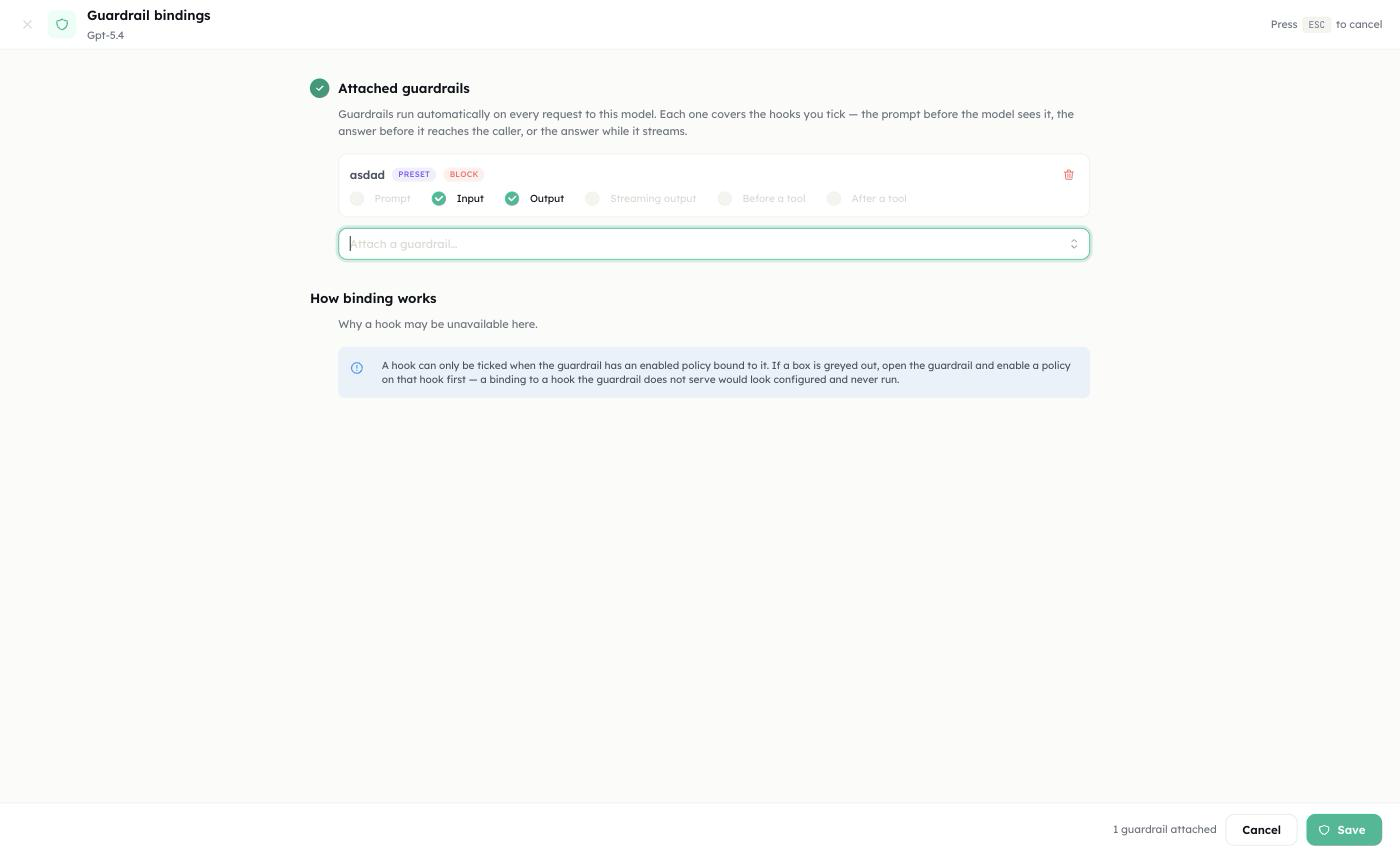
- Tick the hooks you want this binding to cover. Only hooks the guardrail can actually serve are selectable — the rest are greyed out. A checkbox is enabled only when the guardrail has an enabled policy bound to that hook (see Detection Families for which family serves which hooks); a binding to a hook the guardrail doesn't serve would look configured in the UI and simply never run. If a box you need is greyed out, go back into the guardrail itself and enable a policy on that hook first, then return here.
- Repeat Attach a guardrail… to stack additional guardrails on the same model — for example a
pii/secretspreset oninput.pre/output.preplus a separatetool_accessguardrail ontool.pre/tool.post. Each attached guardrail gets its own row and its own set of hook checkboxes. - Save. The card on the Configure tab now lists each attached guardrail with the hooks it's bound to; every matching request is evaluated from that point on — no redeploy, no restart.
Removing a guardrail from a model is the same modal: open Edit, use the trash icon on its row to detach it, and Save.
Same guardrail, different hooks per model
Because bindings are per-model, one guardrail can run in Enforce mode (blocking) on a production model and in Monitor mode on a staging model — or with only output.pre ticked on one model and all six hooks ticked on another. The guardrail's own mode (Enforce/Monitor/Off, set on the guardrail itself) still applies uniformly wherever it's bound; what changes per model is which hooks are wired up.
Actions
| Action | Behavior |
|---|---|
block | Reject the request with a structured error |
redact | Mask the detected values ([REDACTED:email]) and continue — PII, secrets, and word filter only |
warn | Allow the request; findings are attached to the response and logged |
flag | Allow the request; findings are attached to the response and logged |
The guardrail-level action applies to LLM-backed findings; the PII, secrets, and word-filter policies carry their own action so you can, for example, redact PII while blocking profanity. A binding in monitor mode never blocks, regardless of the configured action.
Failure Mode
LLM-backed checks can fail (model down, unparseable verdict). failMode decides what happens:
open(default) — the content passes; the failure is logged.closed— the content is treated as a violation (evaluation_errorfinding). Also fires when an LLM check is enabled with no model configured.
Evaluation Logs
Every evaluation is persisted to guardrail_evaluation_logs with pass/fail, findings, latency, the calling surface (chat.completions, agent, client-api, …), and the request id. Detected values and the stored input text are masked before persistence — raw PII never lands in the log. The guardrail detail page charts pass rate, findings by type/severity, and a time series; alert rules can trigger on guardrail_fail_rate, guardrail_avg_latency_ms, and guardrail_total_evaluations.
API
Evaluate Guardrail
POST /api/client/v1/guardrails/evaluate
Authorization: Bearer <token>{
"guardrail_key": "pii-checker",
"text": "My email is john@example.com and my phone is 555-0100"
}Response:
{
  "passed": false,
  "action": "block",
  "findings": [
    { "type": "pii", "category": "email", "severity": "high", "message": "Email address detected", "action": "block", "block": true, "value": "john@example.com" }
  ],
  "guardrail_key": "pii-checker",
  "guardrail_name": "PII Checker",
  "message": "Content blocked by guardrail:\n• Email: Email address detected",
  "redacted_text": null
}When the matching policy's action is redact, passed is true and redacted_text contains the masked text to use instead of the original.
Inference Integration
The input.pre and output.pre hooks are what the older inputGuardrailKey / outputGuardrailKey slots mapped to — attaching a guardrail to a model still configures those two hooks under the hood:
Request → prompt.pre → input.pre → Provider call → output.pre → Response
                                        │ tool.pre / tool.post around each tool call
              │ block: 400 guardrail_block         │ block: 400
              │ redact: rewrite user msg           │ redact: rewrite content
└ warn/flag: annotate + log └ warn/flag: annotate + log- Non-blocking findings are attached to the chat completion response under a
guardrailsextension field ({ input?: {...}, output?: {...} }). - Streaming responses cannot be blocked after delivery;
output.stream.deltaruns as a post-hoc audit as the stream is delivered, feeding evaluation logs and alerts (source: chat.completions:stream). - Agents apply the same guardrails around their conversation loop (
source: agent), withtool.pre/tool.postfiring around each tool call.
When a guardrail blocks a request during inference, a GuardrailBlockError is thrown with the guardrail key, action, and findings.
Management Endpoints
| Method | Endpoint | Description |
|---|---|---|
GET | /api/guardrails | List guardrails (includeTemplates=true returns category/list catalogs) |
POST | /api/guardrails | Create guardrail (validates that LLM checks have a model) |
GET | /api/guardrails/:id | Get guardrail |
PATCH | /api/guardrails/:id | Update guardrail |
DELETE | /api/guardrails/:id | Delete guardrail |
POST | /api/guardrails/evaluate | Evaluate text (dashboard) |
GET | /api/guardrails/:id/evaluations | Evaluation logs + aggregate (pass rate, latency, time series) |
Related
- AI App Gateway (Enterprise) — its Policy tab's personal-data check runs one of your PII guardrails rather than reimplementing detection; its
tool_access-equivalent role for coding-agent traffic sits alongside this hook plane's owntool_accessfamily.