

Invoice and expense processing
The problem
Every month the same file lands: an export from the billing system, a folder of supplier PDFs, or a shared inbox full of expense claims. Someone opens a spreadsheet and starts reconciling.
What it costs today:
- Two days a month of an analyst who was hired to analyse, not to retype.
- Silent errors. A mistyped amount in row 340 does not announce itself; it shows up a quarter later as a variance nobody can explain.
- No breakdown. Asking "what did we spend with this supplier this year" means rebuilding the analysis from scratch, because the last three months of work exist only as finished spreadsheets.
What good looks like
The export goes in, a validated file comes out, and every line item leaves a countable trace behind — so the breakdown by supplier, cost centre or month is a query, not a project.
What you build
Task  (the export, in the detail or as an attachment)
      │
      ▼
 [Parse Invoices]  Node.js → validate, normalise, fall back to a sample
      │             _context: { invoices: [...], totalAmount }
      ▼
 [Counter]  define-variable  processed = 0
      │
      ▼
 [For Each Invoice]  ─┬─▶ [Increment Counter]
      │               └─▶ [Record Event]  invoice_processed
      ▼
 [Build CSV]  Node.js
      │
      ▼
 [Publish CSV]
      │
      ▼
[Finish] invoiceCount, totalAmount, processed, filePieces used: a Task trigger, Execute Node.js, Define Variable, an Each loop, Increment Variable, Track Event, Publish File.
Implementation
1. Take the input the way finance actually sends it
Give the flow a Task trigger. Finance can then paste a JSON array into the task detail, or attach the export as a file — both reach the flow, as detail and attachments.
2. Parse and validate before you loop
Add an Execute Node.js step. This is where the payload becomes trustworthy:
module.exports = async function (context) {
  let invoices = [];
  try {
    const parsed = JSON.parse(String(context.detail || '').trim());
    if (Array.isArray(parsed)) invoices = parsed;
  } catch (e) {}

  // A demo-safe fallback so the flow is testable without real data.
  if (invoices.length === 0) {
    invoices = [
      { id: 'INV-1001', customer: 'Acme',    amount: 1250.5 },
      { id: 'INV-1002', customer: 'Globex',  amount: 890 },
      { id: 'INV-1003', customer: 'Initech', amount: 4310.75 }
    ];
  }

  const total = invoices.reduce((s, i) => s + Number(i.amount || 0), 0);

  return {
    count: invoices.length,
    total,
    _context: { invoices, totalAmount: total }
  };
};Two conventions matter here. Anything you return under _context becomes a top-level run variable — that is how invoices and totalAmount become available to later steps by bare name. And validating here, rather than trusting the loop, means a malformed row fails in one obvious place instead of halfway through 400 iterations.
3. Create the accumulator before the loop
Add a Define Variable step: processed, type number, value 0.
This looks like ceremony until you hit the rule it exists for: inside a loop, a body step's own output holds only the last iteration. After the loop, inc.value is the value from the final item, not the total. Anything you want to survive the loop must be a variable created before it and grown inside it.
4. Loop over the line items
Add an Each step. Its array variable is a bare path, not a template:
invoicesNot {{invoices}}. If the path does not resolve to an array the step quietly does nothing and reports an error in its result, rather than failing the run — which is exactly the kind of silent no-op you want to know about.
Inside the loop body you get item and index. Add two steps:
- Increment Variable —
processed, by 1. - Track Event — this is the audit trail:
| Field | Value |
|---|---|
| Event name | invoice_processed |
Dimension customer | {{loop.item.customer}} |
Measure amount | {{loop.item.amount}} |
One event per line item is what turns this flow from "a script that made a CSV" into a queryable spend history.
5. Build and publish the output
A second Node.js step assembles the CSV and returns it as base64 in _context; Publish File attaches it to the run as invoices.csv.
Finish with a Final step declaring invoiceCount, totalAmount, processed and file — the numbers someone will want to sanity-check before opening the file.
What happens at run time
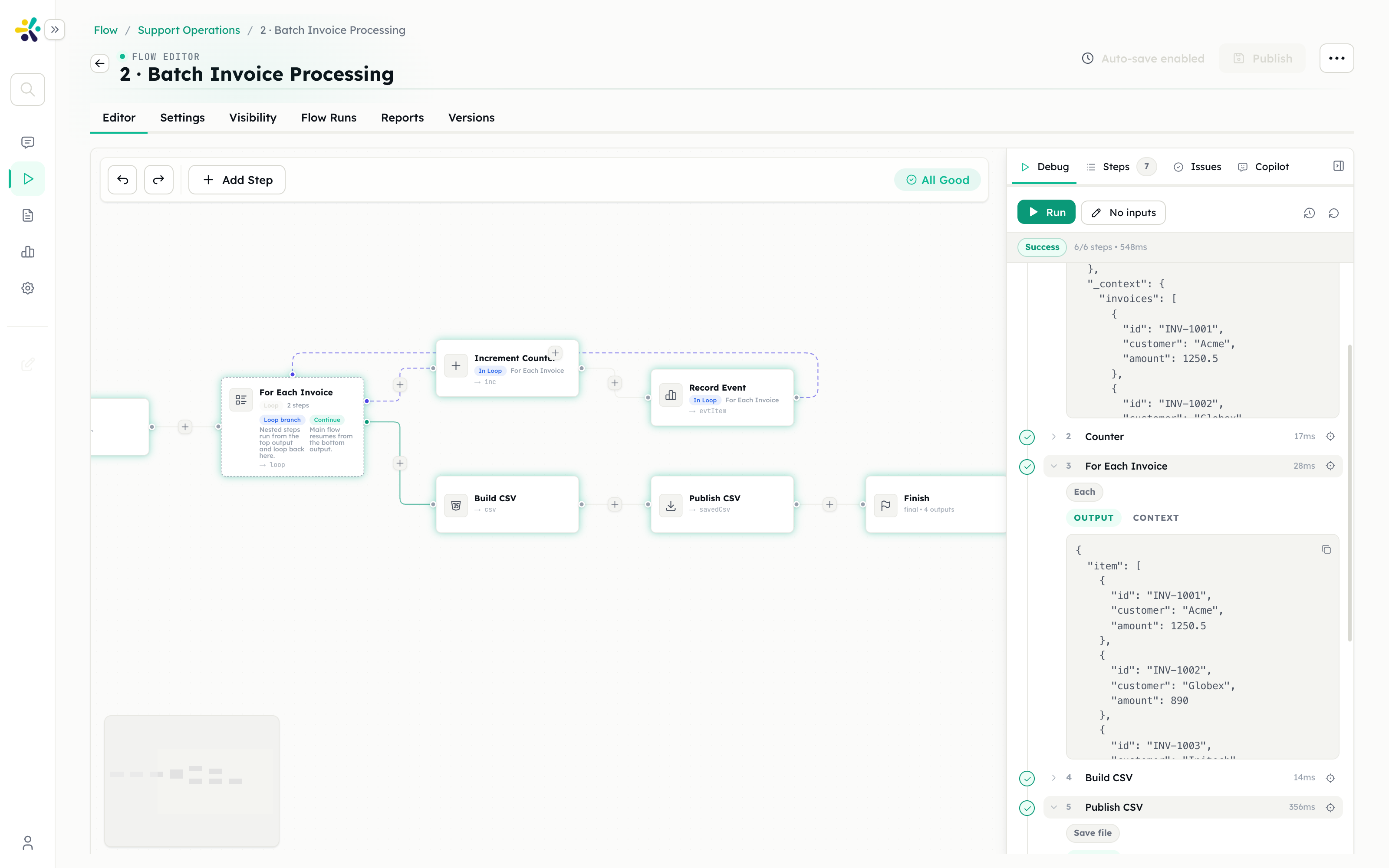
The whole pass takes well under a second for a few hundred rows, because nothing here calls a model — it is parsing, arithmetic and file writing. The run trace shows each step with its real input and output, so a wrong total is traceable to the row that caused it.
The task ends Completed, with the CSV under Output files.
What you get
- A validated file, produced the same way every month.
- A run trace per month, so "what did we run on the March export" is answerable a year later.
- A Reports tab that breaks spend down by customer over time, straight from the
invoice_processedevents — no extra work, because the loop already recorded it.
Extensions
Read the PDFs, not just the JSON. Attach the supplier PDFs to the task and add a Read File step plus a Smart Agent with structured output to extract { supplier, invoiceNumber, amount, dueDate } per document. The loop stays exactly the same.
Produce a real workbook. Swap the CSV builder for JSON to Excel when finance wants formulas and multiple sheets.
Gate the payment run. If the flow is going to submit anything, put a User Approval step in front of it showing the total and the count. Approvals pause the run and resume it in place — see ticket triage for how that behaves.
Run it on a schedule. Replace the Task trigger with a Schedule trigger once the input arrives somewhere predictable.
Pitfalls
The accumulator that resets. Creating the counter inside the loop means it is recreated every iteration. Create it before.
Template braces on the array variable. The Each step takes invoices, not {{invoices}}.
Assuming the loop failed loudly. An unresolvable array path is a no-op with an error in the step result, not a failed run. Check the count on the Final step.
Sending an unbounded loop at a model. If you add an agent call inside the loop, 400 invoices means 400 model calls. Batch them, or classify once over the whole set instead.
Related
- Each step and the loop rules
- Track Event and the Reports tab
- Customer feedback analysis — the same loop shape over text